About This Tool
How this percentage calculator handles eight different question types with one small set of formulas
Percentage questions come in more shapes than people expect. Finding 25% of 200 is a different operation from asking what percent 50 is of 200, which is different again from asking what number, after a 15% increase, becomes 230. This tool covers all eight common phrasings as separate tabs, each wired to its own formula, rather than forcing every question through a single generic calculation that gets the algebra wrong for half the cases.
All eight modes run as plain arithmetic in your browser. There is no server round trip, the result updates the instant you change either number.
The core relationship behind every mode
Every percentage question is a rearrangement of one equation: part equals percent, expressed as a decimal, times whole. Which of the three quantities, part, percent, or whole, is missing determines which mode you need and how the formula gets rearranged to solve for it.
Mode 1: X% of Y
Solving for the part. Convert the percent to a decimal by dividing by 100, then multiply by the whole: result = (a / 100) × b.
Mode 2: X is what % of Y
Solving for the percent. Divide part by whole, then multiply by 100 to express it as a percentage: result = (a / b) × 100.
Mode 3: Percent change from X to Y
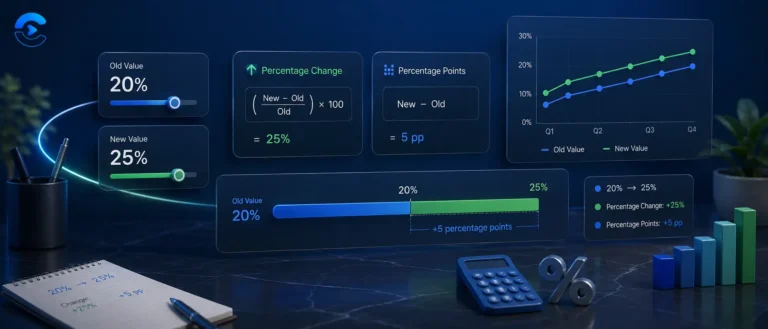
The difference between new and original, divided by the original, times 100: result = ((b − a) / a) × 100. A positive result means an increase, negative means a decrease.
Modes 4 to 8: increase, decrease, and reverse lookups
Increasing X by Y% multiplies by (1 + Y/100). Decreasing multiplies by (1 − Y/100). The reverse questions, "X is Y% more than what," divide instead of multiply, solving the same equation for the base value rather than the result.
// mode 1: X% of Y
result = (a / 100) * b;
// mode 3: percent change from a to b
result = ((b - a) / a) * 100;
// mode 6: X is Y% more than what? (reverse of mode 4)
result = a / (1 + b / 100);
| Question type | Formula | Example |
|---|
| 25% of 200 | (25/100) × 200 | 50 |
| 50 is what % of 200 | (50/200) × 100 | 25% |
| Change from 80 to 100 | ((100−80)/80) × 100 | +25% |
| 200 increased by 15% | 200 × 1.15 | 230 |
| 230 is 15% more than what | 230 / 1.15 | 200 |
Worked example: percent change from 80 to 100. Difference is 100 − 80 = 20. Divide by the original: 20 / 80 = 0.25. Multiply by 100: 25%. Because 100 is larger than 80, the tool labels this a percentage increase, not a decrease. This is the formula that trips people up most often, because it always divides by the original value, never the new one. Reversing that division, dividing by 100 instead of 80, would give a wrong answer of 20%, a mistake that shows up constantly in casual "percent off" math.
Verification step included
Modes that solve for a hidden base value, like "X is Y% more than what," show a verification line that reapplies the percentage to the computed base and confirms it lands back on the original number you entered.
Guarded against division by zero
Modes 2, 3, 6, 7, and 8 all involve a division. The tool checks for a zero denominator, including 100% in mode 7 and -100% in mode 6, before calculating, and shows a clear message instead of a silent NaN.
8 distinct question modes
Step-by-step formula breakdown
One-click copy of the result
- Percentage covers the general mathematical definition and notation this tool implements.
- Relative change and difference explains the asymmetry between percent increase and percent decrease used in modes 3 through 8.
Percentage questions people get wrong
Working out a discount at checkout, calculating a tip or sales tax, figuring out how much a salary changed year over year, reverse engineering an original price from a sale price and a known discount percentage, and checking whether a reported statistic such as sales grew 12 percent, was calculated against the correct base period. Anywhere a number is being compared against another number as a proportion, one of these eight modes almost certainly matches the question being asked.
Percent change is not symmetric
A price that drops 20% and then rises 20% does not end where it started. Start at 100, take off 20% and you have 80. Add 20% of 80 and you reach 96, not 100. The second change is measured from a smaller base, so it adds less. To get back to 100 from 80 you need a 25% rise. The same logic explains why a stock that falls 50% has to double, a 100% gain, just to break even. Mode 3 always divides by the starting value, which is why it shows these asymmetric numbers correctly.
Percent versus percentage points
When an interest rate moves from 4% to 5%, it has risen by one percentage point. As a relative change it has risen by 25%, because 1 is a quarter of 4. News reports mix these up all the time. If you are comparing two rates or two shares, subtract them for the change in points, and use mode 3 for the relative change in percent.
Taking tax or a discount back out of a price
A common mistake is to remove 19% VAT from a gross price by taking 19% off. That gives the wrong net price, because the tax was added to the net price, not to the gross. If a jacket costs 119 including 19% tax, use mode 6: 119 is 19% more than what? The answer is 100. Mode 7 does the same job for discounts: if a sale price of 85 is 15% off, the original price was 100.
Quick mental shortcuts
10% of any number is the number with the decimal point moved one place left, so 10% of 245 is 24.5. 5% is half of that, and 1% moves the point two places. Percentages also swap: 8% of 50 is the same as 50% of 8, which is 4. When a question looks awkward, flipping it often makes it easy. The calculator shows every step, so you can check your shortcut against the exact answer.