About This Tool
How this case converter finds word boundaries in twelve different styles
Changing letters to upper or lower case is one line of code. The hard part of a case converter is deciding where one word ends and the next begins, especially when the input is already camelCase or snake_case and has no spaces to go by. This tool solves that with a single word splitting function that every style shares, so camelCase, PascalCase, snake_case, kebab-case and CONSTANT_CASE all come from the same source of truth.
Everything happens in your browser as you type. The text never leaves the page, there is no server call, and nothing is stored once you close the tab.
The word splitter, the part that actually matters
Before any style is applied, the tool runs your input through a function that breaks it into an array of plain words. That function is doing more work than it looks like.
Step 1 Lower to upper boundary
A lowercase letter or digit directly followed by an uppercase letter gets a space between them. The check uses Unicode letter classes, so it works for accented and non Latin letters too. This is what splits helloWorld into hello World.
Step 2 Acronym boundary
The rule /(\p{Lu}+)(\p{Lu}\p{Ll})/gu catches a run of capitals followed by a capital and a lowercase letter, and splits before the last capital. This is what turns XMLParser into XML Parser instead of X M L Parser.
Step 3 Delimiter normalization
Apostrophes inside words are dropped, so don't stays one word. Everything else that is not a letter or digit, such as underscores, hyphens, dots, commas and brackets, becomes a space, and the text is split into words.
Step 4 Style is applied per word
camelCase lowercases the first word and capitalizes the first letter of every word after it. PascalCase capitalizes every word. snake_case and kebab-case lowercase every word and join with _ or -. CONSTANT_CASE reuses the snake_case output and uppercases it, and dot.case joins with .. Each line is converted on its own, so a pasted list of names comes back as a list.
// the word splitter every identifier style calls
function words(s){
return s
.replace(/(\p{L})['’](\p{L})/gu, '$1$2')
.replace(/(\p{Ll}|\p{N})(\p{Lu})/gu, '$1 $2')
.replace(/(\p{Lu}+)(\p{Lu}\p{Ll})/gu, '$1 $2')
.replace(/[^\p{L}\p{N}]+/gu, ' ')
.trim().split(' ')
.filter(function(w){ return w.length > 0; });
}
Title Case, Capitalized Case and Sentence case keep your spacing and punctuation. Title Case follows the usual headline rule: every word is capitalized except short articles, conjunctions and prepositions such as a, the, and, of and to, which stay lowercase unless they are the first or last word or follow a colon. Hyphenated words are handled part by part, so you get Up-to-Date. Capitalized Case simply capitalizes every word. Sentence case capitalizes the first letter of each sentence and each new line, and fixes a lone i to I. If your text has lowercase letters, words with capitals inside them, like iPhone, NASA or McDonald, are kept as they are. Text typed in all capitals is lowercased first.
A worked case conversion
Input: convert now text tools
| Style | Output |
|---|
| camelCase | convertNowTextTools |
| PascalCase | ConvertNowTextTools |
| snake_case | convert_now_text_tools |
| kebab-case | convert-now-text-tools |
| CONSTANT_CASE | CONVERT_NOW_TEXT_TOOLS |
| Title Case | Convert Now Text Tools |
Round tripping is not lossless. Feed XMLHttpRequest in and convert to snake_case, and the acronym boundary rule splits it to xml_http_request, which is correct. But convert that back to camelCase and you get xmlHttpRequest, not the original capitalization. Case conversion between compound styles is a one way trip once an acronym has been broken into separate words.
Every mode, and what it is actually good for
toggle case
Walks the string character by character and flips each letter's case independently: c === c.toUpperCase() ? lower : upper. Punctuation and digits pass through untouched since flipping their case is a no-op.
UPPERCASE and lowercase
Plain calls to the native String.prototype.toUpperCase() and toLowerCase(), which apply Unicode case mapping rather than a simple ASCII shift, so accented letters convert correctly too.
The panel also tracks character count for both input and output live, along with word, line and sentence counts for the input, counting words as runs of letters and digits, characters as you see them (an emoji counts as one), lines by line breaks, and sentences by end punctuation followed by a space.
Where these naming styles come from
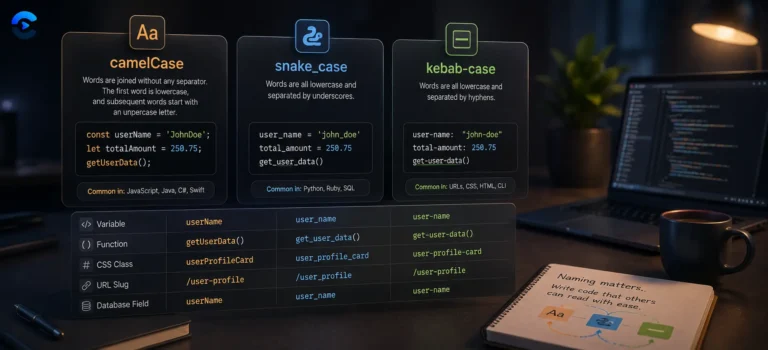
camelCase in JavaScript and Java APIs
snake_case in Python and Ruby
kebab-case in CSS and URLs
CONSTANT_CASE for constants in C and Java
Where each case belongs
Renaming a database column from snake_case to the camelCase a JavaScript API expects, converting a spreadsheet header row into PascalCase class names, turning a blog post title into a kebab-case URL slug, cleaning up shouty CONSTANT_CASE pasted from a legacy config file, and fixing text that got stuck in tOGGLE cASE after a bad keyboard layout switch. Developers moving data between languages with different naming conventions are the most common users, closely followed by anyone tidying up copy for a title bar or headline.