About This Tool
How this password generator sources randomness, and why that choice actually matters
The single most important fact about any password generator is where its random numbers come from, and this one gets it right. Every password, PIN, passphrase and memorable string this tool produces is built using crypto.getRandomValues, the Web Crypto API's cryptographically secure random number source, not Math.random. That distinction is not academic. Math.random is a fast, statistically decent generator meant for things like animation timing, but its underlying algorithm is not designed to resist prediction, and in some browser engines its internal state has been reconstructed from a handful of observed outputs. crypto.getRandomValues draws from the operating system's cryptographic random source, the same class of generator used to create TLS session keys.
// the actual randomness source, from the tool source
function secRand(n) {
var limit = 4294967296 - (4294967296 % n);
var x;
do { x = rand32(); } while (x >= limit);
return x % n;
}
// rand32() reads from crypto.getRandomValues
Every character selection in every mode calls this one function. Nothing about your generated password is transmitted anywhere, computed on a server, or logged. The whole thing runs in the tab and disappears when you close it.
The four generation modes
Random
Builds a character pool from whichever of lowercase, uppercase, digits and symbols you enable, optionally filtering out ambiguous characters like 0, O, 1, l, I, plus any custom characters you exclude. It draws every character from that pool and keeps the result only if it contains at least one character of each type you selected. Otherwise it draws again. Every valid password is equally likely, and no position is forced.
Passphrase
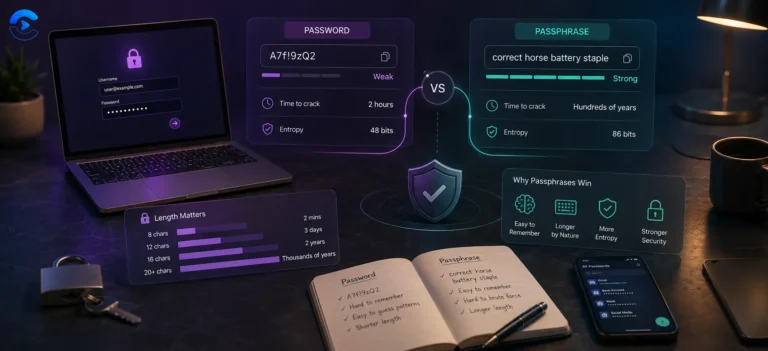
Picks words from the EFF long wordlist of 7,776 words, the same list used for Diceware, so each word adds about 12.9 bits. It joins them with your chosen separator and can capitalise the first letter of each word or just the first word. An optional trailing number between 10 and 99 can be appended. Five words give about 65 bits.
PIN
Draws each digit independently and uniformly from 0 to 9 using the same secure random function, for the exact length you set.
Memorable
Alternates consonant and vowel characters to produce pronounceable strings, capitalises the first letter, and optionally appends a number from 10 to 99. Easier to type and remember but structurally more predictable per character than pure random mode.
How the entropy figure is calculated
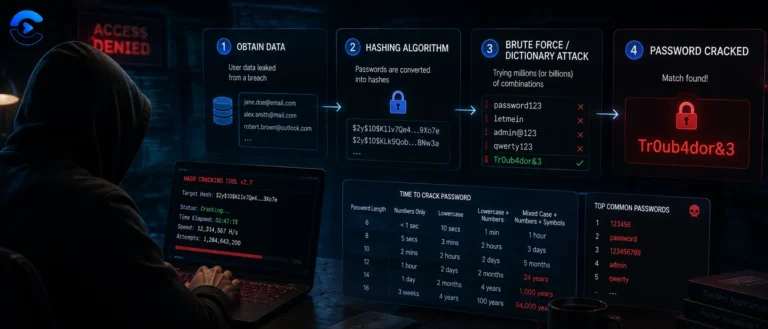
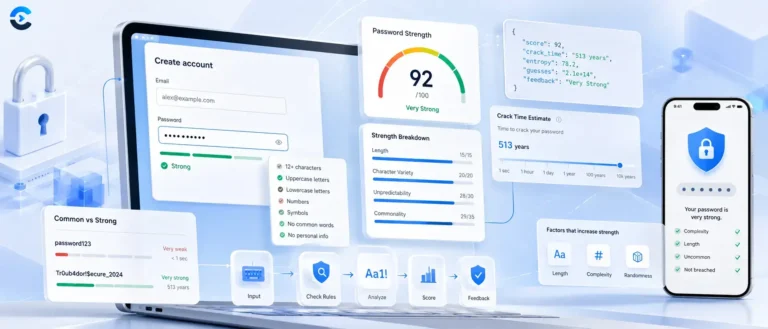
The strength meter measures the generator, not the output. In Random mode it takes the real pool after your exclusions and computes length times log base 2 of pool size, minus the tiny share of strings that would miss a required type. A passphrase counts 12.9 bits per word, a PIN 3.3 bits per digit, and a memorable password counts its consonant and vowel slots. A 16-character password using all four character types draws from 88 characters and lands around 103 bits, well into the Very Strong band. The crack time assumes an offline attack at 10 billion guesses per second.
| Entropy (bits) | Label | What it means practically |
|---|
| Under 28 | Very Weak | Guessable in a trivial online attack |
| 28 to 39 | Weak | Falls to an offline dictionary or hybrid attack quickly |
| 40 to 59 | Fair | Resists casual attacks, weak against dedicated hardware |
| 60 to 79 | Strong | Impractical to brute force with consumer GPU hardware |
| 80 and above | Very Strong | Effectively unbreakable by brute force with current hardware |
No modulo bias. A plain x % n on a 32-bit random number makes low values slightly more likely when n does not divide 2 to the 32. secRand(n) throws away the few values above the largest multiple of n and draws again, so every character, word and digit is exactly equally likely.
Two smaller details worth knowing
History is in-memory only
The last five generated passwords are kept in a local JavaScript array so you can click back to a previous result, but this list is never written to localStorage or any persistent storage. Refresh the page and it's gone.
Batch generation reuses the same logic
Generating multiple passwords at once simply calls the same secure generation function in a loop, each one an independent draw with no relationship to the others.
crypto.getRandomValues, cryptographically secure
Not Math.random
NIST SP 800-63B aligned length guidance
Zero network calls
- W3C Web Cryptography API specifies
getRandomValues and requires it to be backed by a cryptographically secure pseudorandom number generator.
- NIST SP 800-63B is the current US digital identity guideline, notable for de-emphasising forced complexity rules in favour of length and blocking known-breached passwords.
- EFF's Diceware wordlists are the larger, more rigorously curated word sets that inspired the passphrase mode here.
- MDN getRandomValues reference explains exactly why
Math.random should never be used for anything security-sensitive.
Building a password you can trust
Generating a fresh password for a new account signup, creating a memorable passphrase for a password manager's master password, producing a numeric PIN for a device lock screen, batch generating credentials when provisioning several service accounts at once, and replacing a reused or weak password flagged by a breach notification service.