About This Tool
How this UTM builder assembles, validates and remembers your campaign links
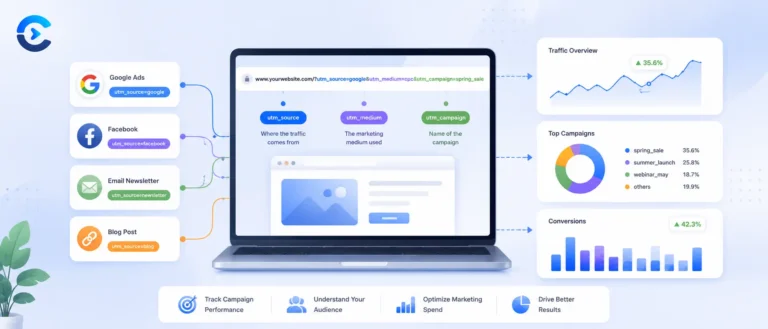
UTM parameters are a convention, not a protocol enforced by browsers, they exist only because Google Analytics and most other analytics platforms agree to read five specific query string keys and attribute a visit’s traffic source based on their values. This tool runs entirely client side. It builds the query string in your browser, validates the required fields before letting you copy anything, and stores your recent links in your browser’s own localStorage, never on a server.
The five standard parameters, plus one extra
| Parameter | Required | Purpose |
|---|
| utm_source | Yes | The referrer, for example google, newsletter, or facebook. |
| utm_medium | Yes | The marketing medium, for example cpc, email, or social. |
| utm_campaign | Yes | The specific campaign, product, or promotion name. |
| utm_term | No | Paid search keyword, mainly used with Google Ads. |
| utm_content | No | Distinguishes similar content or links within the same ad or email, useful for A/B testing. |
| utm_id | No | A newer addition tying the link to a specific campaign ID in Google Ads or Analytics, not part of the original five but included here since it appears in current Google documentation. |
How the link actually gets built
Step 1 Validate the required fields
The base URL must start with http:// or https://, and source, medium and campaign must all be non-empty, checked with regex and simple truthy tests before the Copy or Save buttons will do anything.
Step 2 Choose the right separator
The tool checks whether your base URL already contains a question mark. If it does, parameters get appended with an ampersand, if not, the first parameter starts with a question mark, so UTM tags never break an existing query string.
Step 3 Encode every value
Each field value is trimmed and passed through encodeURIComponent, so spaces, ampersands, and other special characters in a campaign name never corrupt the resulting URL.
Step 4 Assemble in a fixed order
Parameters are always appended in the same order: source, medium, campaign, then term, content and id if present, matching the conventional order used across Google’s own documentation and most analytics dashboards.
// buildUrl(), adapted from source
var sep = url.indexOf(‘?’) !== -1 ? ‘&’ : ‘?’;
var params = [];
params.push(‘utm_source=’ + encode(source));
params.push(‘utm_medium=’ + encode(medium));
params.push(‘utm_campaign=’ + encode(campaign));
if (term) params.push(‘utm_term=’ + encode(term));
if (content) params.push(‘utm_content=’ + encode(content));
if (id) params.push(‘utm_id=’ + encode(id));
return url + sep + params.join(‘&’);
// sample output
https://example.com/landing?utm_source=newsletter&utm_medium=email&utm_campaign=weekly_newsletter
Consistency matters more than correctness here. There is no validation that stops you from typing Facebook in one link and facebook in the next, and most analytics platforms treat UTM values as case sensitive strings, so those two would show up as separate rows in your source and medium reports. This tool cannot catch that kind of drift for you, it is worth agreeing on a fixed lowercase naming convention across your team before generating links at scale, and the five built-in presets, email, social, paid, newsletter and affiliate, exist mainly to nudge you toward one.
Saved history
Clicking Save writes the finished URL and a timestamp into a localStorage array capped at the ten most recent entries, so you can revisit or copy a link you built earlier without regenerating it from scratch.
CSV export
The saved history can be exported as a two column CSV of URL and timestamp, useful for pasting into a campaign tracking spreadsheet alongside spend and performance data.
Pure client-side URL builder
History stored in localStorage only
Five standard parameters plus utm_id
Campaign tracking references
Attribution this makes possible
Tagging links for a paid search campaign so spend can be tied back to conversions in Analytics, building distinct tracked links for each email newsletter send, generating separate utm_content values to A/B test two versions of the same social ad, and keeping a running, exportable log of every campaign link a small marketing team has generated this quarter.