
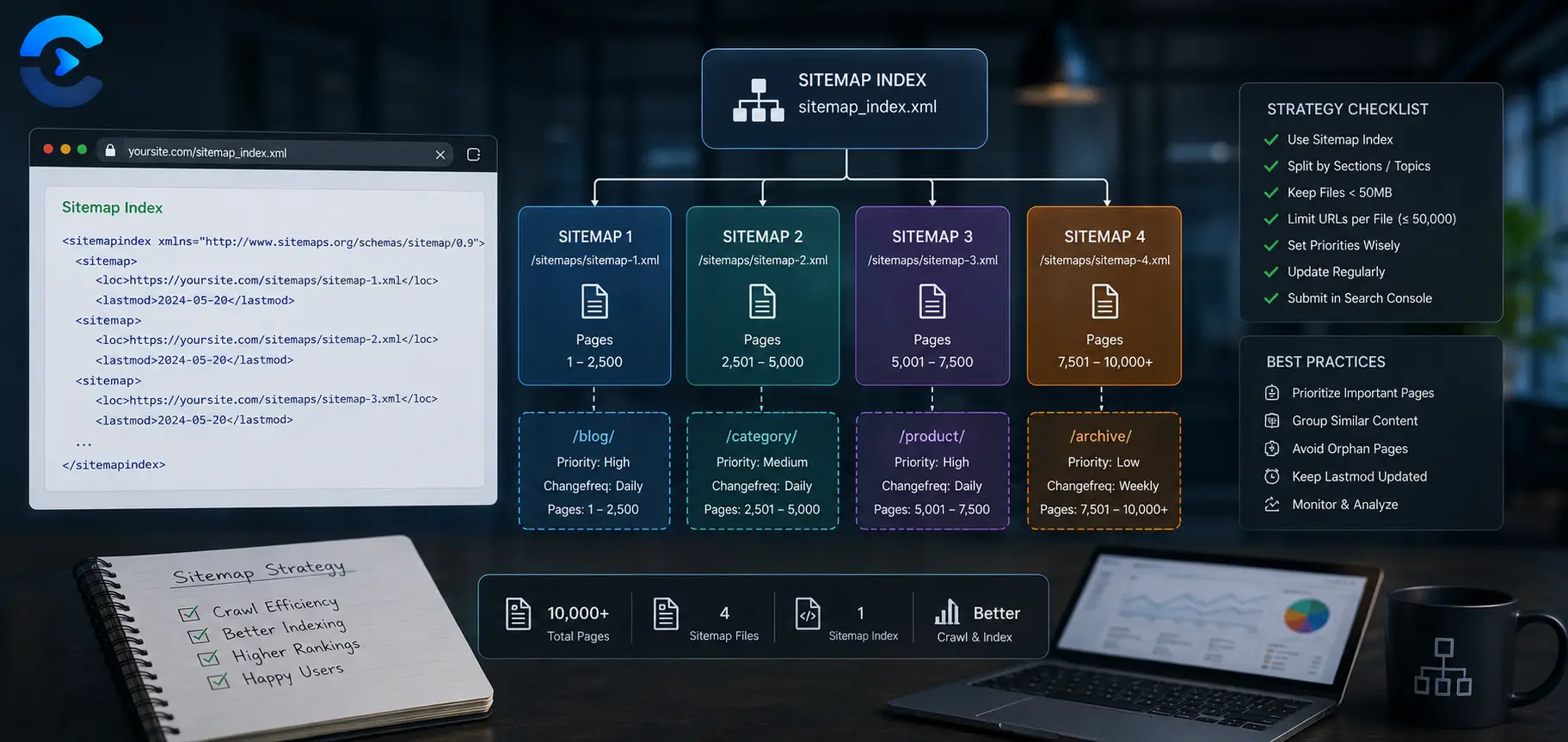

Sitemap Strategy for Large Websites (10K+ Pages)
A sitemap strategy for large websites means splitting your URLs into multiple sitemap files grouped by content type or date, linking them together with a sitemap index file, and using them to steer search engines toward your most valuable pages first. This matters because the XML sitemap protocol caps every file at 50000 URLs or 50MB uncompressed, so any site with 10000 or more pages needs a structured split rather than one giant file. Done well, this approach helps search engines discover new and updated pages faster and spend their crawl budget on the sections that actually drive traffic.
Why one sitemap file breaks down past 50000 URLs
The XML sitemap protocol sets a hard ceiling: a single sitemap file cannot list more than 50000 URLs, and the uncompressed file cannot exceed 50MB. Most sites hit the URL count limit long before the file size limit. If your site has 60000 product pages and you try to cram them into one sitemap.xml, search engines will simply ignore anything past the cap or refuse the file outright. That is the first sign your sitemap strategy for large websites needs restructuring.
Even below the hard limit, a single massive file causes practical problems. It is slow to generate, slow to parse, and hard to debug. If ten pages inside a 40000 URL file have errors, you have no easy way to isolate which section is causing trouble. Splitting the file by logical groups fixes both issues at once.
A sitemap strategy for large websites means splitting your URLs into multiple sitemap files grouped by content type or date, linking them together with a sitemap index file, and using them to steer search engines toward your most valuable pages first.
What a sitemap index file actually does
A sitemap index is a small XML file that lists the locations of your other sitemap files instead of listing URLs directly. You submit the index file to Google Search Console and Bing Webmaster Tools, and each linked sitemap can hold up to 50000 URLs of its own. A site with 300000 pages might use six or seven child sitemaps, each covering a distinct section, all referenced from one index.
This structure is not just a workaround for the URL cap. It gives you visibility. Search Console reports indexing status per sitemap, so you can see instantly whether your blog posts are indexing well while your category pages lag behind, instead of staring at one lump sum number for the whole site.
Splitting by content type
The most common and most useful way to divide a large site is by content type. A typical ecommerce or publishing site ends up with separate sitemaps for:
| Sitemap file | Contains | Why separate it |
|---|---|---|
| sitemap-products.xml | Individual product pages | Usually the largest set and the highest commercial value |
| sitemap-categories.xml | Category and collection pages | Changes less often, easy to monitor separately |
| sitemap-blog.xml | Blog posts and articles | Updates frequently, benefits from faster recrawl signals |
| sitemap-static.xml | About, contact, policy pages | Rarely changes, low priority for frequent crawling |
Grouping this way lets you spot problems fast. If the products sitemap shows a sudden drop in indexed pages, you know exactly where to look instead of auditing the whole domain.
Splitting by date for fast moving sections
For sections that grow continuously, like blog archives or news content, splitting by date works better than splitting by type alone. A news publisher might generate a new sitemap file every month, such as sitemap-2026-06.xml and sitemap-2026-07.xml, each listing only that period's articles. Older files stay stable and rarely need rechecking, while the current month's file gets crawled often because it is small and changes daily. This keeps your crawl budget focused on new content instead of forcing search engines to reparse thousands of old, unchanging URLs every time they check for updates.
Generate a compliant sitemap in minutes
Building split sitemaps by hand is tedious and easy to get wrong, especially when you are tracking the 50000 URL limit across multiple files. The XML Sitemap Generator creates a properly formatted sitemap file you can use as the starting point for each content type or date range in your index, so you spend your time on the split strategy instead of hand writing XML tags.
Try the XML Sitemap GeneratorHow crawl budget prioritization works with sitemaps
Crawl budget is the rough number of pages a search engine is willing to crawl on your site within a given window. Large sites need to spend that budget wisely, and a well split sitemap is one of the clearest signals you can send about what matters most. Listing a URL in a sitemap does not guarantee a crawl, but it does tell search engines the page exists and is worth considering, which is especially valuable for pages buried deep in your internal link structure.
The sitemap protocol includes two optional hints: priority, a number from 0.0 to 1.0 suggesting relative importance, and lastmod, a timestamp showing when the page last changed. Google has stated plainly that it treats these as suggestions, not commands. Priority values are largely ignored today, but lastmod is still useful when it is accurate. An honest lastmod date can prompt a faster recrawl of genuinely updated pages. A dishonest one, like a script that stamps every page with today's date regardless of actual changes, trains search engines to distrust your sitemap entirely.
Practical prioritization comes less from the priority tag and more from structure. Keep your highest value pages, like top selling products or cornerstone articles, in smaller, cleaner sitemap files that update reliably. Keep low value or rarely changing pages in their own separate file so they do not dilute the signal sent by the pages you actually want crawled often.
Building the split step by step
Start by exporting a full list of indexable URLs from your CMS or database. Group them by the content types listed above, then check each group's count. Any group over 45000 URLs should be split further, either by date or by an alphabetical or ID range, to leave headroom before hitting the 50000 cap. Generate each child sitemap, then build one index file referencing all of them with correct absolute URLs and lastmod dates. Submit only the index file in Search Console, not each child sitemap individually, since the index handles that automatically.
Before submitting, confirm your robots.txt file references the sitemap index location so crawlers that check there first can find it without a manual submission. If you have not set that up yet, a robots.txt generator makes it quick to add the sitemap directive correctly. It is also worth confirming your important pages carry the right canonical signals, since a canonical tag checker can catch cases where duplicate or parameterized URLs are competing with the canonical version for crawl attention.
Keeping the sitemap clean over time
A sitemap strategy for large websites is not a one time setup. Pages get deleted, redirected, or merged, and a sitemap full of dead URLs wastes crawl budget and erodes trust in the file. Run a periodic check with a broken link checker to catch 404s and redirect chains before they pile up in your sitemap files. It also helps to review page load performance regularly, since a page speed analyzer can flag slow sections of the site that may be limiting how much a search engine is willing to crawl in one session.
What to do first on a large site
Once a site passes roughly 10000 pages, a single sitemap file stops being reliable and a split structure becomes the right sitemap strategy for large websites. Group your URLs by content type or by date, link every child file from one sitemap index, and keep the files clean so search engines can spend their crawl budget on the pages that matter. Start with the XML Sitemap Generator to produce your first properly formatted file, then repeat the process for each section of your site.
A sitemap strategy for large websites in practice: sizing, naming and upkeep
The guide above explains why you split files. This section shows how to size them, name them and keep them healthy. A sitemap strategy for large websites fails most often in upkeep, not in the first build.
How many files does a sitemap strategy for large websites need?
The protocol cap is 50000 URLs per file, but do not fill files to the brim. Leaving headroom means a growing section does not push a file over the limit next month. A common habit is to cap each file near 40000 URLs. The sums below use that cap.
| Site size | Files at the 50000 cap | Files at a 40000 working cap | Note for your sitemap strategy for large websites |
|---|---|---|---|
| 60000 URLs | 2 | 2 | One index, two children in a small sitemap strategy for large websites |
| 120000 URLs | 3 | 3 | Split by content type first in your sitemap strategy for large websites |
| 300000 URLs | 6 | 8 | Add date splits for the fast moving section |
| 1000000 URLs | 20 | 25 | Automate the sitemap strategy for large websites or it will drift |
What naming rules keep a sitemap strategy for large websites tidy?
- Name files by purpose, such as sitemap products 1. A good sitemap strategy for large websites reads clearly at a glance.
- Keep numbering stable. Reshuffling URLs breaks reports, and a sitemap strategy for large websites depends on those reports.
- Put the index file at the root and list it in robots.txt, so the sitemap strategy for large websites is easy to find.
- Only list URLs that return 200 and are canonical. A sitemap strategy for large websites is worth little if it lists redirects.
- Update the lastmod value only when content truly changes, since a sitemap strategy for large websites relies on honest dates.
How do you audit a sitemap strategy for large websites each month?
Pick one hour a month. Open each child sitemap in Search Console to review the sitemap strategy for large websites and compare submitted URLs with indexed URLs. A gap of a few percent is normal. A gap that grows month after month points to thin pages, duplicates or blocked URLs. Fix the cause in the template, not the file. That habit keeps a sitemap strategy for large websites honest.
Then check freshness. Search engines use lastmod only when it proves reliable, so a file that stamps every URL with the current date teaches them to ignore it. Honest dates are a quiet but real part of any sitemap strategy for large websites.
Priority and change frequency
Google has said it ignores the priority and changefreq fields. Skip them in any sitemap strategy for large websites and spend your time on clean URLs and accurate dates instead.
Which mistakes weaken a sitemap strategy for large websites?
- Listing noindex pages. A sitemap strategy for large websites should name only URLs you want indexed.
- Mixing http with https, or www with non www. Choose one version across the whole sitemap strategy for large websites.
- Forgetting the index. Every child file must join the sitemap strategy for large websites through it.
- Letting a catalog import push one file past 50000 URLs. Alert on size to protect the sitemap strategy for large websites.
- Including URLs blocked by robots.txt. A sitemap strategy for large websites should never contradict robots.txt.
- Never retiring old files. A sitemap strategy for large websites needs a plan for deleted sections too.
| Section | Split rule | Review cadence |
|---|---|---|
| Products | By category range, a core part of a sitemap strategy for large websites | Weekly |
| Blog or news | By month | Daily file, monthly archive, per the sitemap strategy for large websites |
| Category pages | One file, rarely changes | Monthly |
| Images and video | Separate extension files within the sitemap strategy for large websites | Quarterly |
| Legal and static | One small file | Yearly |
Which tools support a sitemap strategy for large websites?
A generator handles small sites, but a sitemap strategy for large websites needs automation. For big ones, build the files from your database or CMS on a schedule. You can still test a section with the XML sitemap generator to see how a clean file looks. Pair it with a correct robots.txt sitemap line. The best sitemap strategy for large websites is the one your team can rerun without thinking.
| In this guide |
|---|
| Why one sitemap file breaks down past 50000 URLs |
| What a sitemap index file actually does |
| How crawl budget prioritization works with sitemaps |
| Keeping the sitemap clean over time |
| What to do first on a large site |
FAQ: Sitemap Strategy for Large Websites
How many URLs can one sitemap file hold?
A single XML sitemap file can hold a maximum of 50000 URLs, and the uncompressed file cannot exceed 50MB. If your site exceeds either limit, you need to split the URLs across multiple sitemap files and connect them with a sitemap index.
What is a sitemap index file?
A sitemap index is an XML file that lists the locations of your other sitemap files instead of listing individual page URLs. You submit the index to Search Console, and search engines follow it to find and crawl each child sitemap.
Does sitemap priority actually affect ranking or crawling?
Google has confirmed it treats the priority attribute as a suggestion rather than a strict instruction, and in practice it has very little influence on crawl behavior. Your time is better spent on clean site structure and internal linking than tuning priority values.
Should I split my sitemap by content type or by date?
Content type works well for most sites, separating products, categories, and blog posts into their own files. Date based splitting is better for sections that grow continuously, like news archives, since it keeps recent content in small, frequently checked files.
How does lastmod help with crawl budget?
An accurate lastmod timestamp tells search engines a page has genuinely changed and may deserve a recrawl sooner. If lastmod is inaccurate or updated on every page regardless of real changes, search engines tend to lose trust in the signal and rely on it less.
Do I need a separate sitemap for every page type?
Not strictly, but grouping by type makes large sites much easier to monitor. Separate files let you see indexing status per section in Search Console instead of one combined number, which makes problems easier to isolate.
Where should I list my sitemap index for search engines to find it?
Add the sitemap index URL to your robots.txt file with a Sitemap directive, and also submit it directly through Google Search Console and Bing Webmaster Tools. Doing both gives search engines the fastest path to discovering it.
Can too many URLs in a sitemap hurt my SEO?
A bloated sitemap full of outdated, redirected, or duplicate URLs does not directly penalize rankings, but it wastes crawl budget and can slow discovery of your genuinely new content. Keeping sitemaps trimmed and accurate is part of good technical SEO hygiene.
How often should I regenerate my sitemaps?
Fast changing sections like blogs or product catalogs benefit from daily or automated regeneration, while static sections can update weekly or on demand. The goal is to keep lastmod dates trustworthy without regenerating so often that the file becomes noisy.
Sources and further reading
- Google: Manage large sitemaps: sitemap index files and limits.
- Sitemaps.org protocol: the 50,000 URL and 50 MB limits.