About This Tool
How this TDEE calculator turns basal metabolism into a daily calorie number you can actually use
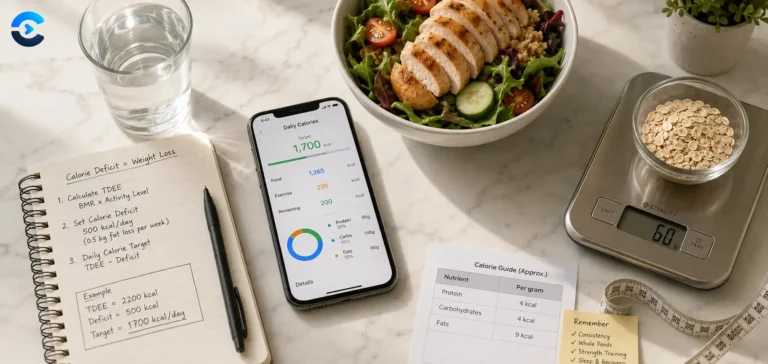
Total Daily Energy Expenditure is everything your body burns in a day, resting metabolism, digestion, and every bit of movement layered on top. This tool builds it in two stages: first it estimates your Basal Metabolic Rate with the Mifflin-St Jeor equation, then it scales that number up by an activity multiplier to reach TDEE, and finally applies a goal based adjustment to land on a calorie target for weight loss, maintenance, or gain.
The whole pipeline runs as plain arithmetic in your browser. Age, weight, and height never leave the page, there’s no server call involved at any step.
Stage one: BMR via Mifflin-St Jeor
The tool uses the 1990 Mifflin-St Jeor equation, derived by fitting measured resting metabolic rate data from 498 healthy adults to weight, height, age, and sex. It’s the formula the Academy of Nutrition and Dietetics recommends over the older Harris-Benedict equation for general use, since it tracks more closely with directly measured metabolic rates in contemporary populations.
Step 1 Convert units to metric
Imperial weight multiplies by 0.453592 to reach kilograms, imperial height multiplies by 2.54 to reach centimetres.
Step 2 Calculate BMR
10 times weight in kg, plus 6.25 times height in cm, minus 5 times age, plus 5 for men or minus 161 for women.
Step 3 Apply the activity multiplier
BMR times a factor from 1.2 to 1.9 depending on how active you report being, giving TDEE.
Step 4 Apply the goal delta and floor
TDEE plus or minus a fixed calorie adjustment for your goal, then floored at 1200 kcal, a widely used minimum below which most adults shouldn’t diet without direct medical supervision.
// adapted from calculate() in the tool source
var bmr = 10 * wkg + 6.25 * hcm – 5 * age + (gender === ‘male’ ? 5 : -161);
var tdee = bmr * mult;
var target = tdee + goalDelta;
target = Math.max(1200, target); // floor
Goal deltas and the pound-per-week logic behind them
| Goal | Daily Adjustment | Approx. Weekly Change |
|---|
| Lose 2 lbs/week | -1000 kcal | -2 lb |
| Lose 1 lb/week | -500 kcal | -1 lb |
| Lose 0.5 lb/week | -250 kcal | -0.5 lb |
| Maintain weight | 0 kcal | 0 |
| Gain 0.5 lb/week | +250 kcal | +0.5 lb |
| Gain 1 lb/week | +500 kcal | +1 lb |
The math behind these deltas rests on the long standing estimate that a pound of body fat stores roughly 3500 kcal, so a 500 kcal daily deficit or surplus works out to about one pound a week. It’s an approximation, actual weight change involves water shifts, glycogen, and metabolic adaptation that this simple linear model doesn’t capture, but it remains a reasonable planning starting point.
The activity multiplier is a self-report, not a measurement. “Moderately active” means something different to everyone who selects it. Wearable-based studies comparing self-reported activity level to measured energy expenditure consistently find people both over- and under-estimate their own activity category. Treat the first TDEE number as a hypothesis, then check it against two to three weeks of real weight tracking and adjust the calorie target based on what actually happens, not just what the formula predicted.
Macro split and BMI, bundled in
Goal-linked macro ratios
Losing weight shifts the split toward 40 percent protein and 30 percent carbs to help preserve lean mass in a deficit. Gaining shifts toward 30 percent protein and 50 percent carbs to fuel training volume. Fat fills whatever percentage remains, converted at 4 kcal per gram for protein and carbs, 9 kcal per gram for fat.
BMI cross-reference
The same height and weight inputs feed a standard BMI calculation alongside the calorie numbers, giving you a second, independent reference point using the WHO’s weight-over-height-squared classification without needing to run a separate tool.
Mifflin-St Jeor BMR formula
1200 kcal safety floor
3500 kcal per pound rule of thumb
This tool provides an educational estimate for planning purposes, not a personalized medical or nutrition prescription. It cannot account for metabolic conditions, medications, or individual metabolic adaptation. Consult a doctor or registered dietitian before starting a significant calorie change, particularly at or near the 1200 kcal floor.
Setting a calorie target
Setting an initial calorie target before starting a cut, maintenance phase, or bulk, recalculating a target after a meaningful weight change since BMR shifts with body weight, cross checking a fitness tracker’s calorie burn estimate against an independent formula, and giving a coach or dietitian a documented starting point to adjust from.