MP3 to WAV Converter
Convert MP3 to WAV instantly with full control over bit depth, sample rate and channels. Decoding and encoding happen entirely in your browser using the Web Audio API, so nothing is ever uploaded to a server.
Click or drop an MP3, AAC, OGG or M4A file
How this converter decodes MP3 to raw PCM and writes a WAV file by hand
Unlike the other audio tools on this site, this one does not load any external encoding library at all. It leans entirely on the browser’s built in Web Audio API to decode your compressed file into raw pulse code modulation samples, then builds a RIFF/WAVE file byte by byte with a hand written encoder function living directly in the tool’s own JavaScript. No upload, no CDN dependency for the conversion itself, and no server round trip anywhere in the code.
Decode, resample, encode
AudioContext.decodeAudioData(), which uses the browser’s native audio decoders, the same ones behind the <audio> tag, to turn compressed MP3, AAC, OGG or WEBM data into an AudioBuffer of floating point samples.
OfflineAudioContext renders the buffer through a silent, non-realtime audio graph at the new rate, producing a properly resampled buffer rather than just relabeling the old one.
DataView, followed by every sample converted from a float in the minus-1 to 1 range into 16, 24 or 32 bit integers, interleaved by channel.
The little detail worth noticing is format code 3 for 32-bit output versus format code 1 for 16 and 24-bit. WAV’s fmt chunk distinguishes integer PCM from IEEE floating point samples, and this tool switches encoding strategy for 32-bit output rather than forcing everything through the integer path, since 32-bit audio is conventionally stored as float.
Bit depth options
| Bit depth | Sample format | Bytes per sample per channel |
|---|---|---|
| 16-bit | Signed integer PCM | 2 bytes |
| 24-bit | Signed integer PCM | 3 bytes |
| 32-bit | IEEE 754 float PCM | 4 bytes |
ctx.close() after each conversion, converting more than a handful of files in one browser session would eventually throw an error when a new context could no longer be created, even though nothing else about the tool had changed.Why WAV output specifically
WAV is a RIFF container holding uncompressed PCM audio, defined by Microsoft and IBM’s original Multimedia Programming Interface specification. It is the natural target for a hand-rolled encoder because it needs no entropy coding, only a header and raw samples.
Input formats accepted
Anything decodeAudioData() can decode: MP3, AAC/M4A, OGG Vorbis and WEBM audio are all commonly supported, though exact codec coverage depends on the visitor’s browser and platform.
Audio encoding references
- MDN AudioContext.decodeAudioData() documents the native decoding call this tool relies on for every input format.
- MDN OfflineAudioContext covers the non-realtime rendering graph used for resampling.
- WAVE PCM soundfile format reference lays out the RIFF chunk structure this encoder writes by hand.
- ISO/IEC 11172-3 is the MPEG-1 Layer III specification defining the MP3 format decoded here.
When you need uncompressed audio
Preparing MP3 recordings for import into a DAW or audio editor that prefers uncompressed input, converting voice memos into WAV for speech to text pipelines that expect PCM, archiving compressed audio in an uncompressed format before further lossy reencoding elsewhere, or feeding sample accurate audio into a tool that does not decode compressed formats itself.
FAQ: MP3 to WAV Converter
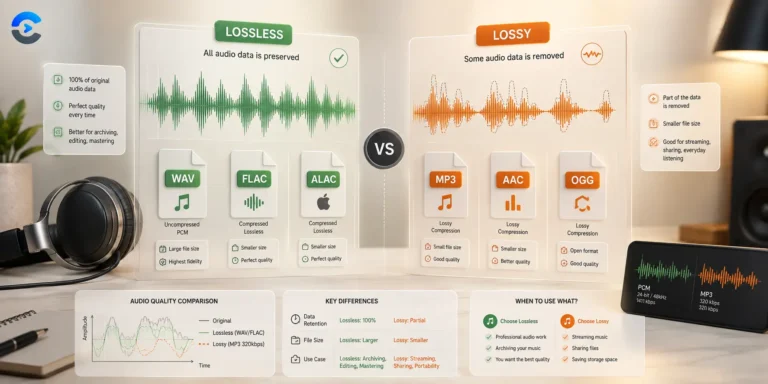
MP3 is a lossy, compressed format, meaning some audio data is permanently discarded to shrink file size. WAV stores uncompressed PCM audio, which most audio editing software, DAWs, and hardware devices expect for accurate playback and processing. Converting to WAV before editing, mixing, or importing into professional tools avoids reencoding artifacts and gives you a format universally supported by video editors and audio interfaces.
No, converting to WAV cannot restore data an MP3 encoder already discarded. What it does is stop any further quality loss. WAV is uncompressed, so once converted, no additional generation loss occurs from repeated editing, exporting, or format shuffling. Think of it as freezing the current quality rather than improving it.
Bit depth controls the dynamic range and precision of each audio sample. 16 bit, CD quality, offers roughly 96dB of dynamic range and is fine for most listening or web use. 24 bit adds more headroom and is standard in professional recording and mixing. 32 bit float is used in production pipelines where extreme dynamic range and zero clipping during processing matter most, at the cost of a larger file.
No. This converter uses the Web Audio API built into your browser to decode the file, and a hand written WAV encoder to write the output, both run locally on your device. Your audio file never leaves your computer or touches a server, which also means there is no file size limit imposed by an upload restriction.
This is expected and correct. MP3 achieves roughly 10 times smaller files through lossy compression, while WAV stores every PCM sample uncompressed. A 4 minute song might be 4MB as an MP3 and 40 to 50MB as a 16 bit, 44.1kHz WAV. If file size matters more than uncompressed quality, keep the file as MP3 or use a lossless compressed format like FLAC instead.
Yes. This tool decodes any audio format your browser can natively play, which typically includes MP3, AAC or M4A, OGG Vorbis, and WebM or Opus. Simply upload the file, the tool detects and decodes it automatically before writing the WAV output, regardless of the original compressed format.
From the blog
Format guides and gotchas
What each format stores, and what quietly disappears in conversion.