
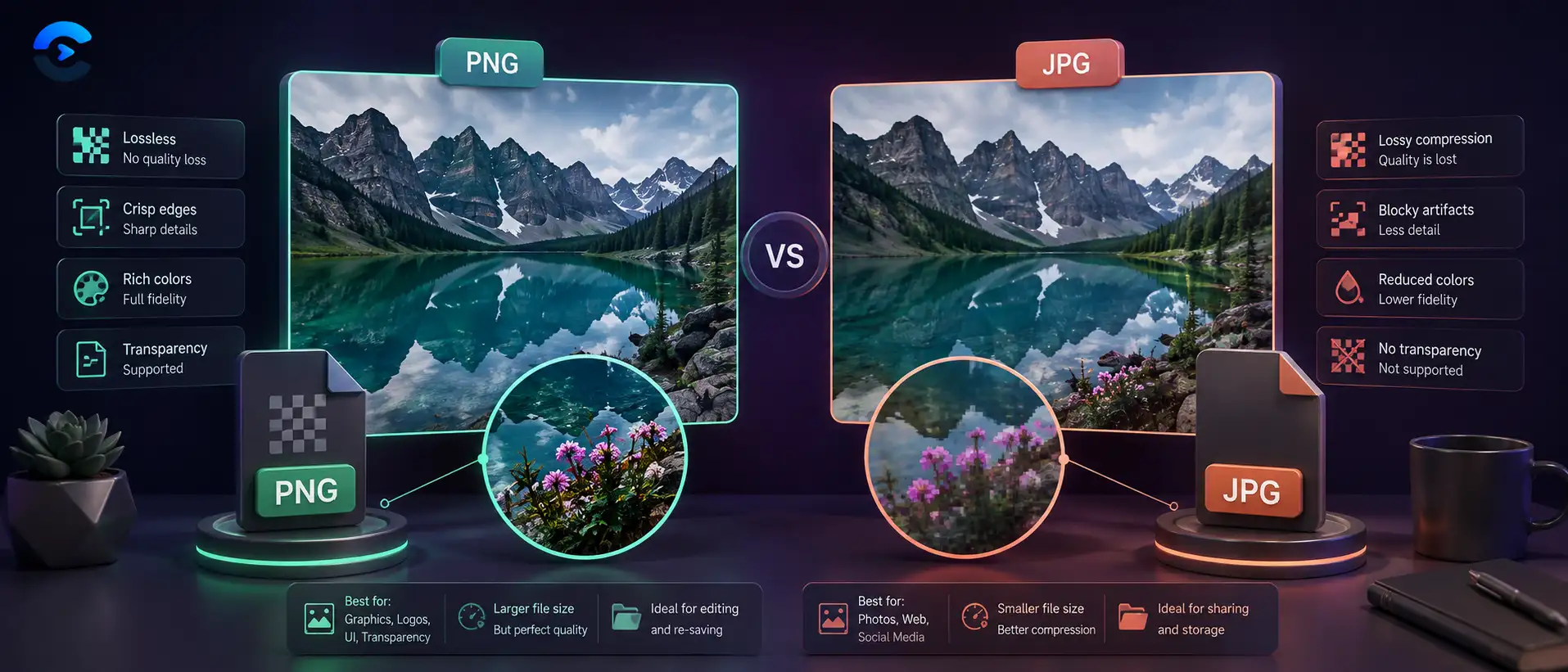

PNG vs JPG Quality Difference: When Each Format Wins
PNG wins for flat color graphics, logos, and text because it never throws away pixel data, while JPG wins for photographs because its compression removes detail the eye barely notices while keeping file size small. The png vs jpg quality difference is not about one format being universally superior, it depends entirely on the kind of image you are exporting. A screenshot saved as JPG often shows smudged edges around letters, while a sunset photo saved as PNG can be ten times larger with no visible quality gain.
Why the png vs jpg quality difference shows up unevenly
Most people assume PNG always looks better than JPG, and in one narrow sense that is true: PNG never discards pixel data, so a screenshot, a logo, or a chart stays exact down to the last pixel. But that rule breaks down once a photograph enters the picture. The png vs jpg quality difference depends on the kind of image you are looking at, not on which format is newer. PNG was built for graphics with large flat areas of a single color and hard edges, such as icons, diagrams, and text overlays. JPG was built for continuous tone photography, where colors blend gradually across countless subtle shades and the eye cannot spot small losses inside that gradient.
Flat color and text favor PNG
Open a screenshot of a spreadsheet or a logo with sharp lettering and save it as a JPG at a normal quality setting. You will usually see faint smudging or a soft halo around every letter and every hard edge. That happens because JPG compresses images in small blocks and approximates color transitions inside each block, and a hard edge between black text and a white background forces the format to guess at values it was never designed to represent cleanly. PNG has no such problem because it stores every pixel value exactly as it was created. For screenshots, wireframes, charts, line art, and anything that needs a transparent background, PNG remains the safer choice almost every time.
Photographic gradients favor JPG in practice
Now take a photo of a sunset with thousands of gradually shifting colors and save it as PNG. The file size will balloon, often five to ten times larger than a well saved JPG, while the visible quality gain is close to nothing because the eye already struggles to separate that many similar shades. JPG’s lossy compression is tuned for exactly this situation: it removes color information most viewers cannot perceive while keeping the overall look of the photo intact. That is why photography sites, product photo galleries, and most blog hero images use JPG rather than PNG, even though PNG is technically lossless.
What happens when you pick the wrong format anyway
Picking the wrong format rarely breaks a project outright, but it quietly costs you in ways that add up. A product page full of PNG photos loads slower on mobile connections, which can push shoppers away before the page finishes rendering. A logo saved as JPG can look fine on a plain white background yet show an ugly rectangle the moment it is placed over a colored header, since JPG cannot hold transparency at all. Even scanned contracts and forms suffer, because JPG compression can soften the small serifs in printed text just enough to make a document look slightly out of focus when zoomed in. None of these mistakes are dramatic on their own, but together they shape how polished a website or a set of files appears to anyone viewing them.
The good news is that fixing a wrong format choice takes only a few seconds once you know which direction to convert. If a photo was mistakenly saved as PNG, converting it to JPG usually shrinks the file dramatically with no visible change. If a logo or screenshot was mistakenly saved as JPG, converting back to PNG will not restore detail that JPG already discarded, so it is worth re exporting from the original source file whenever that is possible instead of relying on a lossy copy as your new master.
A practical reference table
| Image type | Better format | Why it wins |
|---|---|---|
| Screenshot or UI mockup | PNG | Keeps text edges sharp and readable |
| Logo with transparent background | PNG | JPG cannot support transparency at all |
| Outdoor or portrait photograph | JPG | Smaller file with gradients still smooth |
| Product photo for an online store | JPG | Balances load speed with visual quality |
| Icon or flat vector style art | PNG | Flat color blocks stay perfectly crisp |
| Scanned document with printed text | PNG | Avoids smudging around letter edges |
A short checklist before you export
- Check whether the image has flat color and hard edges, or gradual photographic tone.
- If the image needs a transparent background, PNG is the only real option between the two.
- If file size matters more than exact pixel accuracy, JPG usually wins for photos.
- Export a test copy in both formats and compare edges around text or logos at full zoom.
- Keep an original master file, since resaving a JPG repeatedly compounds quality loss over time.
Convert between PNG and JPG without guessing
The Image Converter lets you switch a file between PNG and JPG right in your browser, so you can compare both versions of the same image before deciding which one to publish. Upload a screenshot, a logo, or a photo, pick the target format, and download the result in seconds without installing anything.
Open the Image ConverterRelated tools for finishing the job
Once you have picked the right format, the next step is usually trimming file size or fitting a fixed layout. If your JPG is still too heavy for a web page, run it through the Image Compressor to shrink it further without a visible quality drop. If you need the image to fit specific dimensions for a banner or thumbnail, the Image Resizer handles that without stretching or distortion. You can browse the rest of the file and document tools at convertnow.tools/tools/file-document, or read more format comparisons on the ConvertNow blog.
Key takeaway
Neither format is universally better, they are built for different kinds of images. Choose PNG for flat color, text, and transparency, and choose JPG for photographs and gradients where file size matters. When you are unsure which one fits a specific file, open the Image Converter and compare both versions side by side before you publish.
FAQ: PNG vs JPG Quality Difference
What is the main png vs jpg quality difference?
PNG uses lossless compression so every pixel stays exact, which suits flat color graphics and text, while JPG uses lossy compression that removes detail humans rarely notice in photos but that can blur hard edges.
Is PNG always better than JPG?
No. PNG is better for flat color images, logos, and anything needing transparency, but it produces much larger files for photographs where JPG offers nearly the same visual quality at a fraction of the size.
Does saving a JPG multiple times reduce quality?
Yes. Each time a JPG is opened and resaved, the format reapplies lossy compression, which gradually degrades detail. Keeping an original master file and exporting fresh copies avoids this compounding loss.
Why does my PNG file look so much larger than a similar JPG?
PNG stores every pixel without discarding data, so a photo with millions of subtly different colors produces a large file, while JPG intentionally removes some of that color detail to shrink the file size.
Which format should I use for a logo?
Use PNG for logos, especially if the logo needs a transparent background or has flat colors and sharp edges. JPG often introduces visible smudging around lettering and hard color boundaries.
Which format is better for product photos on an online store?
JPG is generally the better choice for product photography because it keeps file sizes small for faster page loading while preserving enough detail for shoppers to evaluate the product.
Can converting a JPG to PNG restore lost quality?
No. Once detail is removed during JPG compression it cannot be recovered by converting to PNG afterward. The PNG copy will simply preserve whatever quality the JPG already had.
Does PNG support transparent backgrounds while JPG does not?
Correct. PNG supports an alpha channel for transparency, which is why it is the standard choice for logos and icons placed over different colored backgrounds. JPG always fills transparent areas with a solid color.