
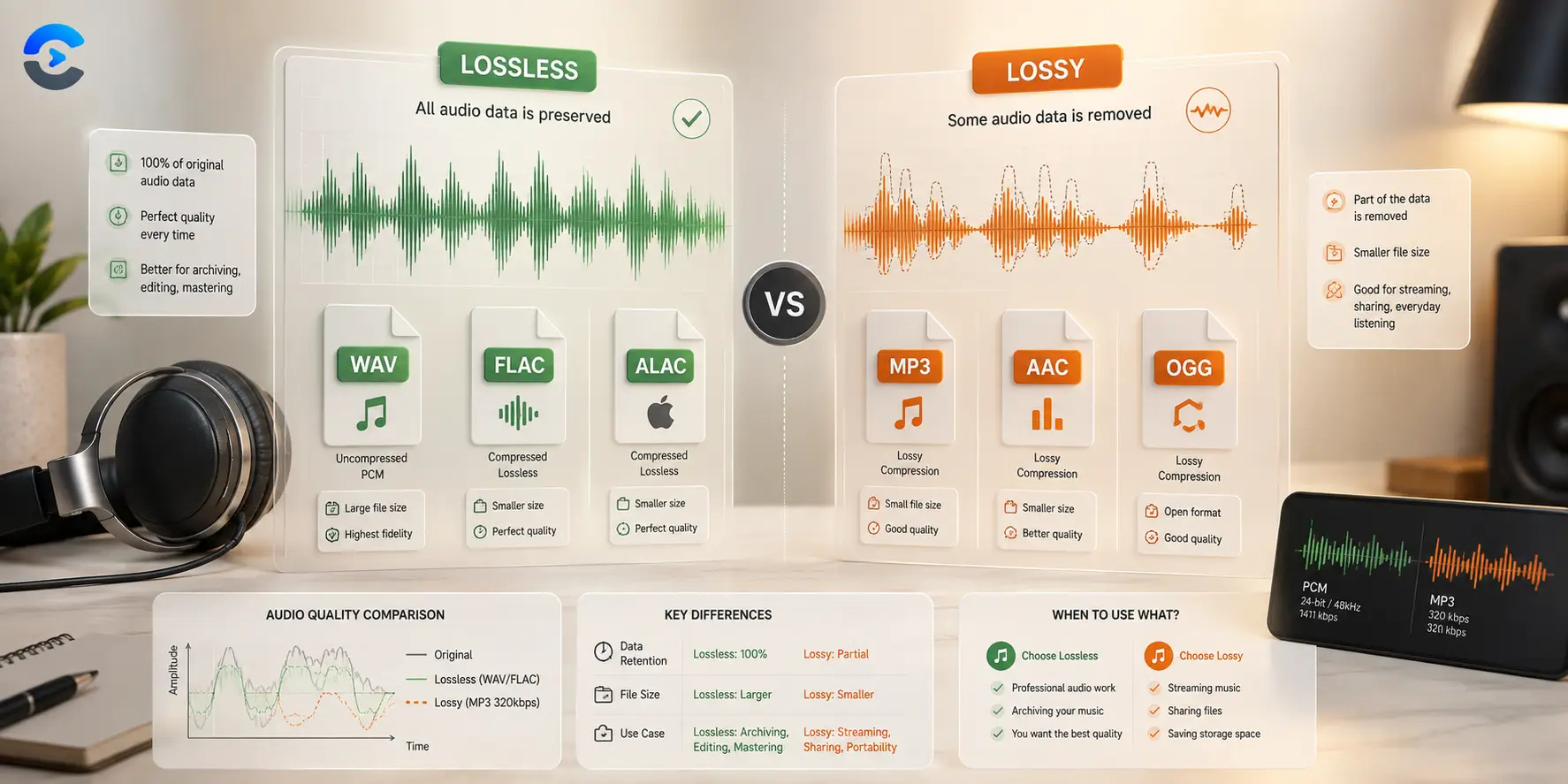

When Do You Need Lossless Audio Instead of MP3
You need lossless audio, such as WAV or FLAC, when you are archiving a master recording or running audio through multiple rounds of professional editing, since repeated processing on a compressed file compounds quality loss. For everyday listening, podcasts, and most streaming, a well encoded MP3 sounds indistinguishable from the source to nearly everyone. The honest answer is to match the format to the job rather than defaulting to one format for everything.
When do you need lossless audio and when MP3 is enough
MP3 works by throwing away audio detail that most human ears cannot easily perceive, which is how it shrinks a file so dramatically. That tradeoff is fine for a single playback pass, but it becomes a problem the moment you edit, re encode, or stack effects on that same file repeatedly, since each pass can throw away a little more.
Casual listening and podcasts
If the final destination is a phone, a set of earbuds, or a car stereo, a properly encoded MP3 at a reasonable bitrate is genuinely fine. Podcasts in particular are almost entirely speech, and speech survives lossy compression extremely well, so there is little practical reason to distribute a podcast as an uncompressed file.
Archival masters and editing chains
A studio recording session, a voiceover master, or any file you expect to reopen and edit later should stay lossless. WAV stores audio with no compression at all, while FLAC compresses the file size without discarding any audio data, so both preserve every detail for future edits. Starting from a lossy file and editing it repeatedly bakes in artifacts that get progressively worse.
A side by side comparison
| Format | Typical file size | Best use |
|---|---|---|
| MP3 | Smallest, roughly a tenth of WAV | Casual listening, podcasts, streaming |
| FLAC | Medium, roughly half of WAV | Archiving without full uncompressed size |
| WAV | Largest, fully uncompressed | Studio masters, active editing sessions |
A short checklist for choosing a format
- Keep your original recording session as WAV or FLAC before you do any editing.
- Export a final MP3 copy only after all editing is finished, not before.
- Use MP3 for anything meant purely for casual playback, such as a finished podcast episode.
- Convert between formats as the situation changes instead of picking one format for every file you own.
To sum up when do you need lossless audio in one place, keep the core idea in mind as you apply it: check the actual numbers for your situation rather than relying on a rule of thumb alone, and revisit the calculation whenever the underlying inputs change.
Getting comfortable with lossy vs lossless
Getting this right matters because small errors compound the longer they go unnoticed, and a quick sanity check now saves a bigger correction later. Write down the inputs and assumptions you used so you can compare results later and spot exactly what changed if the numbers look different next time. Treat any online tool as a way to confirm your own reasoning rather than a black box, since understanding the logic behind the number is what actually builds confidence. Real world data is rarely as clean as a textbook example, so expect to make small adjustments once you apply the same method to your own numbers. Keep the process simple and repeatable so you can run it again next month or next year without relearning the steps from scratch. A second pair of eyes, or a second tool, is a cheap way to catch a mistake before it turns into a bigger problem downstream.
Most people get this wrong the first time not because the concept is hard, but because a small step gets skipped under time pressure. Once the basic method clicks, the same logic tends to show up again in other parts of the same field, which makes the extra few minutes spent learning it worthwhile. Getting this right matters because small errors compound the longer they go unnoticed, and a quick sanity check now saves a bigger correction later. Write down the inputs and assumptions you used so you can compare results later and spot exactly what changed if the numbers look different next time. Treat any online tool as a way to confirm your own reasoning rather than a black box, since understanding the logic behind the number is what actually builds confidence.
Audio Converter
Move between MP3, WAV, FLAC, and more with the Audio Converter, right in your browser.
Open the Audio ConverterMP3 to WAV Converter
Need a lossless copy for editing? Use the MP3 to WAV Converter to get a file your editing software can work with cleanly.
Open the MP3 to WAV ConverterWAV to MP3 Converter
Once editing is finished, shrink your final master down for distribution with the WAV to MP3 Converter.
Open the WAV to MP3 ConverterKey takeaway
Reach for lossless audio when you are archiving a master or editing repeatedly, and reach for MP3 when the file is meant purely for listening. The Audio Converter makes moving between the two a quick step rather than a permanent decision.
FAQ: When Do You Need Lossless Audio Instead of MP3
When do you need lossless audio instead of a compressed file?
You need lossless audio when archiving a master recording or running a file through multiple rounds of professional editing, since compressed formats lose a little detail with each additional pass of processing.
Can most people actually hear the difference between MP3 and WAV?
At a reasonable bitrate, most listeners cannot reliably tell a well encoded MP3 apart from a WAV file during normal playback on everyday speakers or earbuds.
Is FLAC the same as WAV?
No, FLAC compresses the file size without discarding any audio data, while WAV stores the audio completely uncompressed, so FLAC is smaller but both preserve full quality.
Should podcasts be distributed as WAV files?
No, podcasts are almost entirely speech, which survives MP3 compression very well, so distributing a podcast as an uncompressed file mostly adds file size without a meaningful quality benefit.
Why does editing a compressed file repeatedly cause problems?
Each time a lossy file is re encoded, a small amount of additional detail is discarded, and those small losses stack up over multiple editing passes, gradually degrading the audio.
How do I convert an MP3 to WAV for editing?
Upload the MP3 to the MP3 to WAV Converter, and it produces an uncompressed WAV file that your editing software can process without adding further compression artifacts.
What is the best format for final distribution after editing?
Once editing is complete, converting the finished WAV or FLAC master down to MP3 with the WAV to MP3 Converter is usually the right final step for streaming or casual listening.