
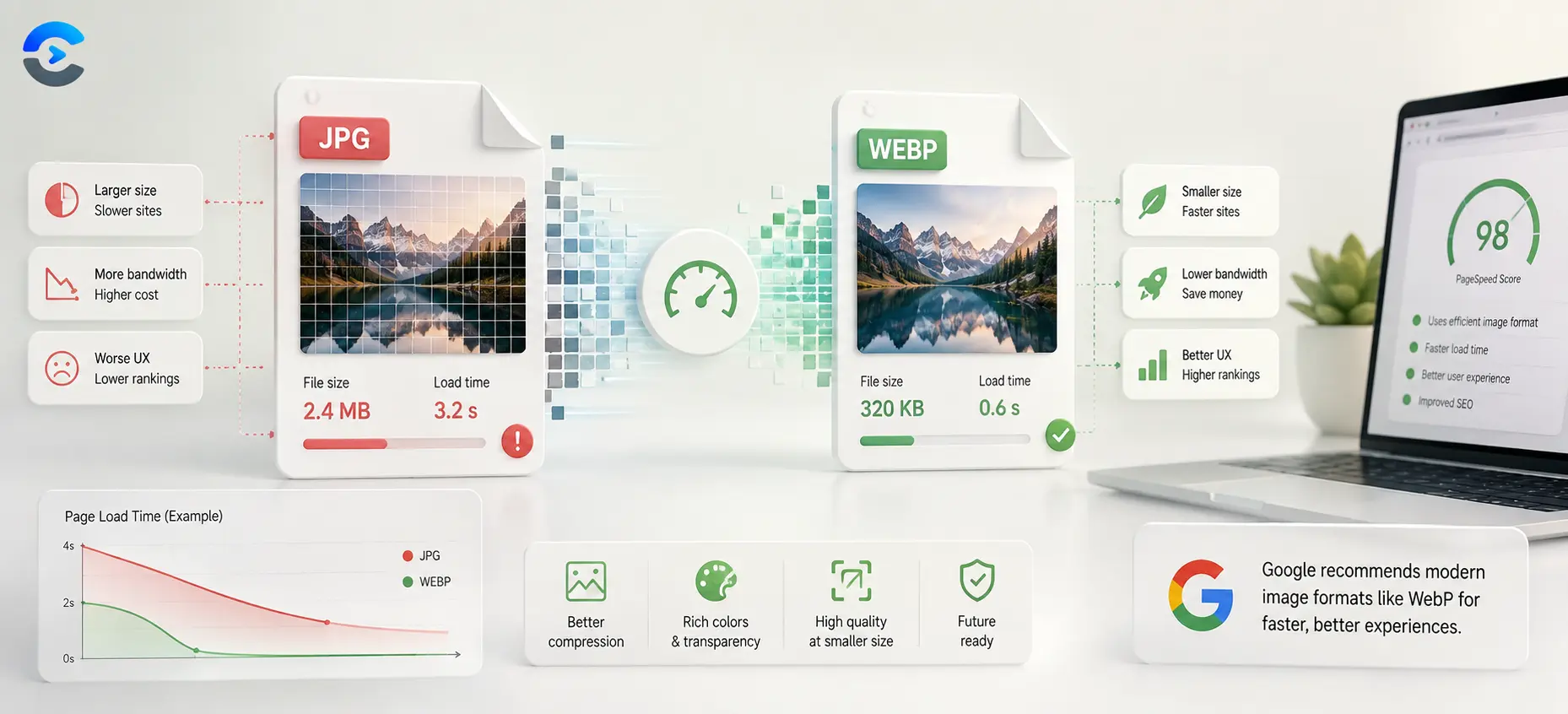

What Is WebP and Why Use It Instead of JPG
WebP is an image format built by Google that compresses photos to a smaller file size than JPG while keeping nearly identical visual quality. Google favors it because smaller image files load faster, and page load speed is a direct factor in search ranking and user experience scores. If your PageSpeed Insights report flags serve images in next gen formats, switching your JPGs to WebP is usually the fastest fix.
What is webp and why use it over an older format
JPG has been the default photo format on the web for decades, but its compression method was designed in the early 1990s. WebP uses newer prediction and encoding techniques that squeeze out redundant data more efficiently, so the same photo can look just as sharp at roughly a quarter to a third less file size.
The file size difference in practice
Take a typical 1600 pixel wide product photo. Saved as a JPG at a quality setting most eyes cannot tell apart from the original, it might land around 280 kilobytes. Export that same photo as WebP at a matching visual quality and it often lands closer to 190 kilobytes, sometimes lower. Across a page with a dozen images, that gap adds up to a meaningfully faster load.
Why this matters to Google specifically
Google’s PageSpeed Insights tool scans your page and checks image weight against format efficiency. When it finds JPG or PNG files that could be smaller as WebP, it flags them under serve images in next gen formats, which lowers your performance score. Since page speed feeds into Core Web Vitals, and Core Web Vitals feed into ranking signals, an easy image swap can move a real number.
When WebP is not the right call
WebP is not universally better in every situation. Very old software or certain print workflows still expect JPG or PNG, and some image editing tools handle WebP less smoothly during editing passes. For final web delivery though, WebP is almost always the safer default.
| Format | Typical file size | Best use |
|---|---|---|
| JPG | Baseline | Universal compatibility, older tools |
| WebP | 25 to 35 percent smaller | Web pages, faster load times |
| PNG | Largest for photos | Graphics with transparency, sharp edges |
A short checklist before you switch a site to WebP
- Convert your existing JPG and PNG images to WebP rather than starting a new photo shoot.
- Keep a JPG fallback if your platform or audience uses very old browsers.
- Re run PageSpeed Insights after the swap to confirm the warning clears.
- Check that image dimensions still match the space they display in, since format alone will not fix a resize problem.
To sum up what is webp and why use it in one place, keep the core idea in mind as you apply it: check the actual numbers for your situation rather than relying on a rule of thumb alone, and revisit the calculation whenever the underlying inputs change.
Getting comfortable with webp
Getting this right matters because small errors compound the longer they go unnoticed, and a quick sanity check now saves a bigger correction later. Write down the inputs and assumptions you used so you can compare results later and spot exactly what changed if the numbers look different next time. Treat any online tool as a way to confirm your own reasoning rather than a black box, since understanding the logic behind the number is what actually builds confidence. Real world data is rarely as clean as a textbook example, so expect to make small adjustments once you apply the same method to your own numbers. Keep the process simple and repeatable so you can run it again next month or next year without relearning the steps from scratch. A second pair of eyes, or a second tool, is a cheap way to catch a mistake before it turns into a bigger problem downstream.
Most people get this wrong the first time not because the concept is hard, but because a small step gets skipped under time pressure. Once the basic method clicks, the same logic tends to show up again in other parts of the same field, which makes the extra few minutes spent learning it worthwhile. Getting this right matters because small errors compound the longer they go unnoticed, and a quick sanity check now saves a bigger correction later. Write down the inputs and assumptions you used so you can compare results later and spot exactly what changed if the numbers look different next time.
Convert your images to WebP in seconds
Drop in a JPG or PNG and export it as WebP with the Image Converter, right in your browser, no software to install.
Open the Image ConverterRelated tools for finishing the job
Format is only one part of image weight. If a photo is still larger than it needs to be after converting to WebP, run it through the Image Compressor to strip out extra data, or use the Image Resizer if the dimensions are bigger than the space they display in. Once your images are lean, check the full page with the Page Speed Analyzer to see how much your score improved, or browse more tips on the ConvertNow blog.
Key takeaway
WebP gives you smaller files at nearly the same visual quality as JPG, which is exactly what Google’s page speed checks reward. Convert your existing images with the Image Converter and clear that warning off your report for good.
FAQ: What Is WebP and Why Use It Instead of JPG
What is webp and why use it instead of JPG?
WebP is an image format that compresses photos to a smaller file size than JPG at nearly the same visual quality, which makes pages load faster and score better on Google’s page speed checks.
Does converting to WebP reduce image quality?
At a matching quality setting, most people cannot tell the difference between a WebP and a JPG of the same photo. Quality loss only becomes visible if you compress far more aggressively than needed.
Why does Google flag my images for next gen formats?
Google’s PageSpeed Insights tool checks whether your JPG or PNG images could be smaller as WebP. If they could, it flags the page under serve images in next gen formats to encourage a faster load.
Do all browsers support WebP?
All major modern browsers support WebP. Very old browser versions may not, which is why some sites still keep a JPG fallback for rare edge cases.
How much smaller is a WebP file compared to JPG?
WebP files are typically 25 to 35 percent smaller than a JPG of the same photo at a comparable visual quality, though the exact savings depend on the image content.
Should I convert every image on my site to WebP?
For photos and most web graphics, yes. Images that rely on transparency or crisp edges may still suit PNG better, so check each case rather than converting blindly.
How do I convert a JPG to WebP for free?
Upload the JPG to the Image Converter tool, select WebP as the output format, and download the converted file directly from your browser.