About This Tool
How this sitemap generator builds spec-compliant XML, entirely offline
You paste a list of URLs, the tool validates each one and writes standards compliant XML sitemap markup in your browser. There is no upload step and no server processing your URL list. The one exception is the JSZip library, which is pulled in dynamically from a CDN only if your list is large enough to require splitting into multiple files, so a normal sized sitemap never triggers any outside request at all.
What the sitemaps.org protocol requires
An XML sitemap is a plain, well defined format. Every entry sits inside a urlset element that declares the sitemaps.org namespace, and each url block can carry four fields.
| Field | How this tool sets it |
|---|
| loc | The URL itself, XML escaped for ampersands, brackets and quotes before being written into the output. |
| lastmod | Either today’s date in YYYY-MM-DD, a custom date you pick, or omitted entirely if you choose none. |
| changefreq | One global value applied to every URL in the batch, or omitted if set to none. |
| priority | Either a single fixed value from 0.0 to 1.0, or automatic, based on how deep the URL sits in the site’s folder structure. |
The automatic priority curve
When automatic priority is enabled, the tool counts the number of nonempty path segments in each URL and assigns a priority that steps down as depth increases, on the reasoning that a homepage is more important than a page four folders deep.
// autoPriorityFor(), from source
function autoPriorityFor(pathname) {
var clean = pathname.replace(/\/+$/, ”);
var depth = clean === ” ? 0 : clean.split(‘/’).filter(Boolean).length;
if (depth <= 0) return 1.0;
if (depth === 1) return 0.8;
if (depth === 2) return 0.6;
if (depth === 3) return 0.5;
return 0.4;
}
A real sample entry
This is the literal shape of one URL block the tool writes, with a two decimal place priority rounded from the depth calculation above.
<?xml version=“1.0” encoding=“UTF-8”?>
<urlset xmlns=“http://www.sitemaps.org/schemas/sitemap/0.9”>
<url>
<loc>https://example.com/blog/post-name/</loc>
<lastmod>2026-08-11</lastmod>
<changefreq>weekly</changefreq>
<priority>0.6</priority>
</url>
</urlset>
The 50000 URL split
Parse and validate
Each pasted line is deduplicated and checked with the native URL constructor, only http and https addresses count as valid, anything else is listed separately as skipped rather than silently dropped.
Check the count
If the valid URL count is 50,000 or fewer, a single sitemap.xml is produced directly, matching the per-file URL limit set by the sitemap protocol.
Chunk and index
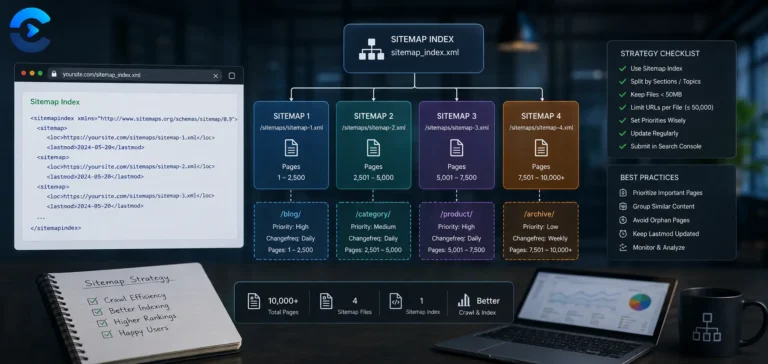
Above that count, the list is split into groups of 50,000, each written to its own sitemap-1.xml, sitemap-2.xml and so on, plus a sitemap-index.xml that lists each file’s location and lastmod, per the sitemap index format.
Load JSZip and bundle
Only at this point does the tool inject a script tag pointing at JSZip on cdnjs, then bundles every generated file plus the index into a single downloadable sitemaps.zip.
The 50MB size cap is not checked here. The sitemap protocol actually sets two limits per file, 50,000 URLs and 50MB uncompressed. This tool enforces the URL count precisely but does not measure the byte size of the generated XML, so a sitemap with unusually long URLs, heavy escaping, or many optional fields could in rare cases exceed the size limit even while staying under 50,000 entries. For most sites this never comes up, but if your URLs are exceptionally long, check the final file size before uploading.
File upload option
Instead of pasting, you can upload a plain text file of URLs, read client side with FileReader and appended to whatever is already in the textarea.
Invalid line reporting
Lines that fail URL parsing are shown separately, up to the first 20, with a count of any remainder, so you can fix source data instead of guessing what got skipped.
Pure client-side XML generation
JSZip loaded on demand only
50,000 URL per file limit enforced
Sitemap protocol references
- The sitemaps.org protocol is the full specification for the XML format and the sitemap index format this tool implements.
- Google’s sitemap building guide covers submission through Search Console and how Google treats priority and changefreq, largely as hints rather than guarantees.
When a sitemap earns its keep
Generating a fresh sitemap after migrating a site to a new platform with no built in sitemap feature, producing a sitemap index for a large e-commerce catalog that has crossed the 50,000 URL mark, quickly rebuilding a sitemap after a bulk URL restructure, and creating a scoped sitemap for just the blog section of a larger site.