
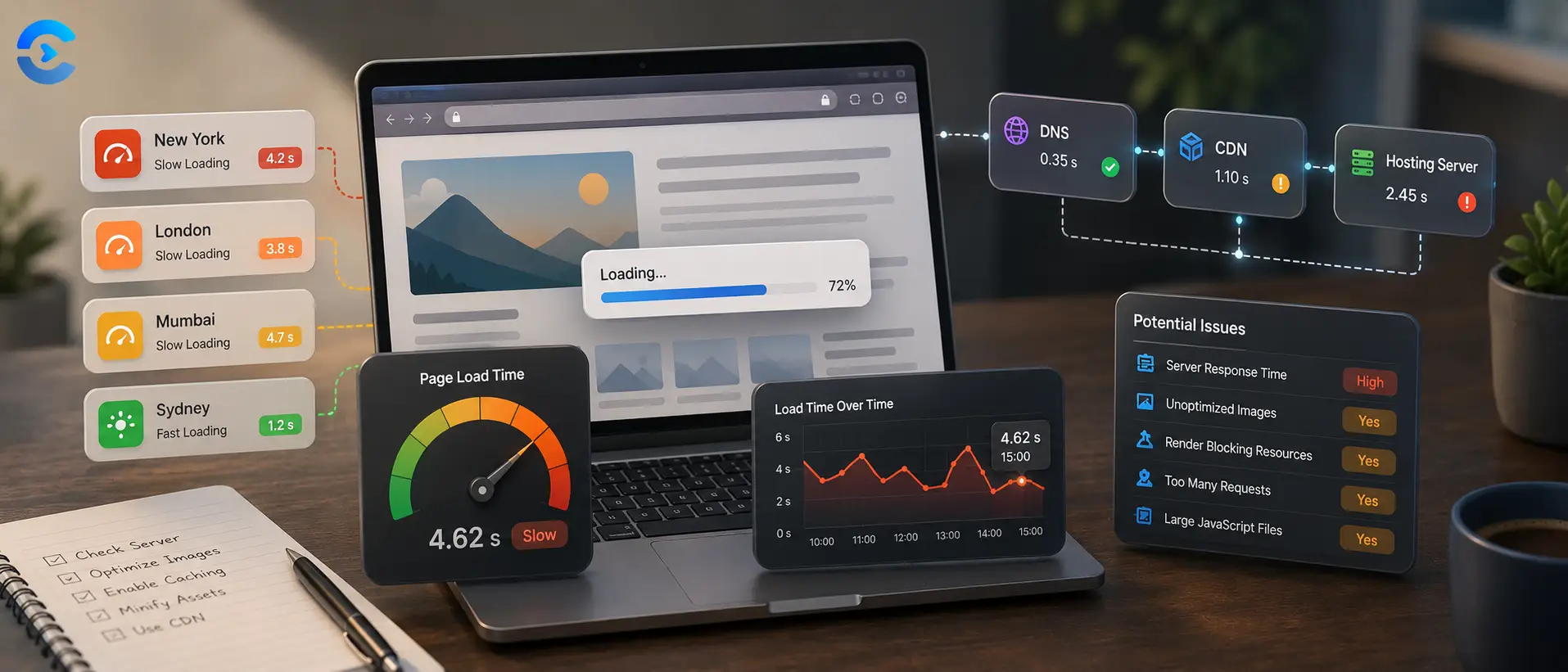

Why Is My Website Slow for Other People but Fast for Me
Network and WebIf your website is slow for other people but fast for you, the likely answer is that your own browser has cached the page locally and you are physically close to the server, while a distant visitor gets neither advantage. Your computer skips re downloading assets it already stored, and your requests travel a short distance to the origin or nearest cache node. A visitor across the ocean has none of that, so every request travels farther and often misses the cache entirely. Testing from an external vantage point is the only way to see what they actually experience.
If your website is slow for other people but fast for you, the likely answer is that your own browser has cached the page locally and you are physically close to the server, while a distant visitor gets neither advantage.
Two hidden advantages that make your own site feel fast
When a developer opens their own site over and over during a work session, the browser quietly builds a local cache of images, scripts, and stylesheets. Every reload after the first one skips the network almost entirely for anything unchanged, so the page appears instantly even if the server itself is struggling. On top of that, many developers work geographically close to their hosting provider or their content delivery network's nearest edge node, so even uncached requests travel a short physical distance with low latency. Neither advantage exists for a visitor browsing from a different city, country, or continent.
What actually slows a distant visitor down
Distance adds real, physical delay. Data cannot travel faster than the speed of light through fiber, so a round trip between, say, Sydney and a server in Virginia adds measurable milliseconds to every single request, and a modern page can make dozens of them. If the site uses a content delivery network, the problem often is not that no CDN exists, it is that the edge cache in the visitor's region is cold, misconfigured, or serving stale content that forces a fetch back to the origin anyway, erasing the benefit the CDN was supposed to provide.
How to find out why your site is slow for other people
Clear your own browser cache and test again in an incognito window first, since that alone reveals how much of your speed was local caching rather than real server performance. Then use a page speed tool that tests from multiple regions around the world rather than from your own machine, and compare the load times across those regions. A large gap between your nearest region and a distant one usually points to caching or edge configuration, while a slow result everywhere points to the origin server itself.
Common causes ranked by how often they appear
| Cause | Typical symptom | Where to check first |
|---|---|---|
| Browser cache masking real speed | Fast for you, no complaints from local users | Test in a private browsing window |
| Cold or misconfigured edge cache | Slow only in specific regions | Page speed test from multiple locations |
| Geographic latency to origin | Slower the farther the visitor is located | Ping test from remote regions |
| Origin server overload | Slow everywhere, including for you eventually | Server response time metrics |
A short checklist before you blame the wrong thing
- Test in a private window with cache disabled before assuming the server is fine.
- Run a page speed test from at least three different geographic regions.
- Ping the server from a distant region to isolate raw network latency.
- Confirm your CDN is actually caching the pages visitors complain about.
- Check whether stale cache rules are forcing repeated trips back to the origin.
Related tools for confirming what visitors actually see
Speed and appearance often break together when caching or regional delivery goes wrong, so it helps to see the page itself, not just the timing numbers. The Website Screenshot Tool captures how a page renders from a given location, which can reveal a stale cached version that a speed number alone would not show. For more diagnostics covering DNS, headers, and uptime, browse the full set of Network and Web tools, and check the ConvertNow blog for more posts on tracking down issues that only affect visitors outside your own network.
Where to start
Your own browser and your own location are not a fair test of speed. Clear your cache, test from several regions, and measure raw latency separately from page load time. Start with the Page Speed Analyzer to see the site the way a real distant visitor does.
Why is my website slow for other people? Distance, handshakes and the numbers behind them
The main post lists the usual suspects. This section measures one of them. When you ask why is my website slow for other people, distance is a physical limit. Light in optical fiber travels at roughly 200,000 km per second, so every round trip has a floor no server tuning can beat.
| Distance to server in why is my website slow for other people | Minimum round trip | Three round trips (TLS 1.3) | Four round trips (TLS 1.2) |
|---|---|---|---|
| Visitor 500 km away, a case of why is my website slow for other people | 5 ms | 15 ms | 20 ms |
| Visitor 2,000 km away, a case of why is my website slow for other people | 20 ms | 60 ms | 80 ms |
| Visitor 5,000 km away, a case of why is my website slow for other people | 50 ms | 150 ms | 200 ms |
| Visitor 10,000 km away, a case of why is my website slow for other people | 100 ms | 300 ms | 400 ms |
| Visitor 15,000 km away, a case of why is my website slow for other people | 150 ms | 450 ms | 600 ms |
These are best case floors on a straight fiber line, and they explain why is my website slow for other people before any code is blamed. Real routes bend and queue, so live numbers are higher. A new connection needs one round trip for TCP, one or two for TLS, then one for the first request. So why is my website slow for other people partly because your own visits reuse warm connections and sit near the server.
Why is my website slow for other people on mobile networks?
Your office wifi hides two costs that matter for why is my website slow for other people. First, bandwidth: a 3 MB page takes 4.8 seconds to download at 5 Mbps, before any script runs. Second, processing: a mid range phone may need several times longer than your laptop to run the same JavaScript. That is a common answer to why is my website slow for other people when the server looks healthy.
Open DevTools and use network and CPU throttling. If the page feels fine on your laptop but crawls with throttling on, you have found why is my website slow for other people on phones.
How do I answer why is my website slow for other people with real data?
Stop trusting your own browser when you investigate why is my website slow for other people. Lab tests from one place tell you one story. Field data tells the rest. Core Web Vitals judge a page by the 75th percentile of real visits, and a good Largest Contentful Paint is 2.5 seconds or less. That means one visitor in four can still have a worse time than the number you see reported.
| Where to look for why is my website slow for other people | What it shows |
|---|---|
| Field data from real visitors, the first step in why is my website slow for other people | Slow regions, devices and networks |
| A multi location lab test, useful when why is my website slow for other people | Time to first byte by city |
| Server logs, a clue to why is my website slow for other people | Slow requests and error spikes |
| Your CDN dashboard, which explains why is my website slow for other people | Cache hit ratio per region |
Fixes to try when why is my website slow for other people
- Put static files on a CDN. A server 100 km away has a floor of 1 ms per round trip instead of 100 ms for 10,000 km. This is the biggest fix for why is my website slow for other people abroad.
- Cache HTML where you can, so a far visitor skips the slow origin trip. Without it, why is my website slow for other people stays unanswered.
- Cut third party scripts. Each new host adds a DNS lookup and a full handshake, another reason for why is my website slow for other people.
- Compress images and use modern formats, a cheap win when why is my website slow for other people on weak links.
- Compare regions with the DNS lookup tool and read the ping and traceroute guide to isolate the network leg.
Work in order, whenever why is my website slow for other people comes up: measure by region, find the slowest leg, fix it, measure again. Asking why is my website slow for other people is easy. The answer is almost always a number you can find once you test where your visitors actually are.
| # | Key takeaway |
|---|---|
| 1 | Test in a private window with cache disabled before assuming the server is fine. |
| 2 | Run a page speed test from at least three different geographic regions. |
| 3 | Ping the server from a distant region to isolate raw network latency. |
| 4 | Confirm your CDN is actually caching the pages visitors complain about. |
See your real load time, not your cached one
The Page Speed Analyzer loads your site the way an outside visitor would, measuring real render and load metrics instead of the artificially fast result your own cached browser shows you.
Open the Page Speed AnalyzerIsolate raw network latency
The Ping Tool measures the round trip time between your server and the point of test, helping you separate pure network distance from caching or server processing delay.
Open the Ping ToolFAQ: Why Is My Website Slow for Other People but Fast for Me
Why is my website slow for other people but fast for me?
Your own browser has likely cached the page's images, scripts, and styles from previous visits, and you may be geographically close to the server or its nearest edge location, neither of which applies to a distant first time visitor.
How do I test my website speed from another country?
Use a page speed testing tool that lets you choose a test location far from your own, or run the test through a proxy or virtual server in that region, then compare load times against your local result.
Does clearing my browser cache show the real load time?
Testing in a private or incognito window with cache disabled removes your personal browser advantage and gives a closer approximation of what a first time visitor experiences, though it still does not account for geographic distance.
Why would a content delivery network not fix slow load times?
A content delivery network only helps if the requested content is actually cached at the edge location nearest the visitor. Cold caches, aggressive cache invalidation, or misconfigured rules can force requests back to the origin server anyway.
What does a ping test actually measure?
A ping test measures the round trip time it takes a small packet of data to travel from a given location to your server and back, isolating raw network latency from other factors like server processing time.
Is server location the main cause of slow load times abroad?
It is a major factor but not the only one. Uncached assets, large unoptimized images, and heavy scripts can all add delay on top of the physical distance a request has to travel.
How often should I test my site from different regions?
Testing after any major deployment, CDN configuration change, or hosting migration is a good habit, along with periodic checks every few months to catch any drift in edge cache behavior.
Sources and further reading
- web.dev: Optimize Time to First Byte: server and CDN fixes for distant visitors.
- MDN: HTTP caching: why your own browser hides the problem.