

What Are UTM Parameters? How to Track Your Traffic
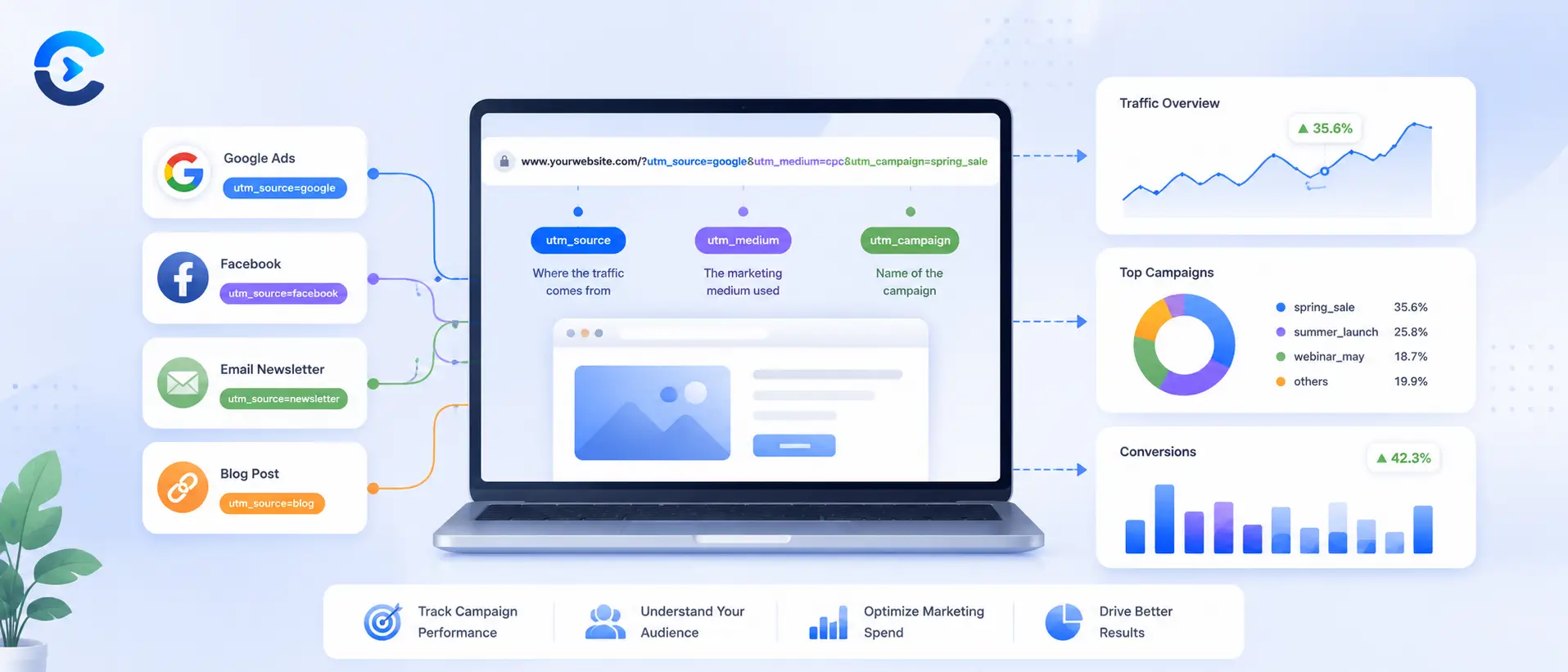
UTM parameters are small tags you add to the end of a URL that tell Google Analytics exactly where a visitor came from, what type of marketing sent them, and which specific campaign was responsible. Instead of seeing generic traffic labeled as direct or referral, you see clean labels like Facebook, paid social, and summer sale, broken down in your reports. They cost nothing to add and take about thirty seconds once you know the five fields involved.
UTM parameters are small tags you add to the end of a URL that tell Google Analytics exactly where a visitor came from, what type of marketing sent them, and which specific campaign was responsible.
FAQ: What are utm parameters?
What are UTM parameters exactly?
UTM parameters are short tags added to the end of a URL that tell Google Analytics the source, medium, and campaign behind a click. They let you see exactly which link a visitor used to reach your site instead of a generic traffic label.
Do I need all five UTM parameters on every link?
No. Only utm_source, utm_medium, and utm_campaign are required for solid tracking. utm_term and utm_content are optional and mostly useful for paid search keywords or comparing two versions of the same ad.
Does adding UTM parameters change how the page works?
No, the destination page loads exactly the same. The tags only live in the URL query string and are read by analytics tools, they do not affect page content, speed, or functionality.
Why is my UTM traffic showing up as direct in Google Analytics?
This usually happens when the parameter values are missing, misspelled, or when the link was reshared without the tags attached. Double check that the full tagged URL, including every ampersand, is the one actually being clicked.
What is the difference between utm_source and utm_medium?
utm_source names the specific platform, like facebook or newsletter. utm_medium describes the broader channel type, like paid_social or email. Together they give both the specific and general picture of where a visit came from.
Should UTM parameter values be lowercase?
Yes, this is strongly recommended. Google Analytics treats values as case sensitive, so Facebook and facebook create two separate rows in your report. Lowercase with underscores keeps everything consistent and easy to filter.
Can I use UTM parameters on links within my own website?
It is best to avoid this. Tagging internal links can overwrite the original campaign source for a visitor who is already in an active session, which corrupts your attribution data rather than improving it.
How do UTM parameters help with marketing attribution?
They connect a conversion or sale back to the exact campaign, channel, and source that drove it. Instead of guessing which efforts pay off, you can compare campaigns side by side using real session and conversion data.
Why UTM parameters matter for tracking traffic
Without tags, Google Analytics guesses where your traffic came from based on referrer data, and that guess breaks down constantly. Links in newsletters, PDFs, social apps, and messaging tools often strip referrer information entirely, so the visit lands in your reports as direct traffic even though it came from a specific campaign you paid for or worked hard on. UTM parameters fix this by attaching the source, medium, and campaign name directly to the link itself, so the data travels with the click no matter where it was posted.
The three required UTM parameters
Every campaign URL needs three tags to be useful. Here is how to build one step by step, starting with a plain page URL and adding each piece.
Step 1: Start with your destination URL
Begin with the page you want people to land on.
https://example.com/spring-sale
Step 2: Add utm_source
This tells Google Analytics which platform or site sent the click, such as facebook, newsletter, or google. Add a question mark to start the query string, then the parameter.
https://example.com/spring-sale?utm_source=facebook
Step 3: Add utm_medium
This describes the marketing channel, such as cpc, email, or social. It sits alongside the source, joined by an ampersand.
https://example.com/spring-sale?utm_source=facebook&utm_medium=paid_social
Step 4: Add utm_campaign
This names the specific campaign so you can separate this push from every other one you run through the same channel.
https://example.com/spring-sale?utm_source=facebook&utm_medium=paid_social&utm_campaign=spring_sale_2026
That finished link is what you would paste into a Facebook ad or post. Anyone who clicks it and lands on your site gets tracked under source facebook, medium paid social, and campaign spring sale 2026, all visible in your reports afterward.
The optional parameters: utm_term and utm_content
Two more tags exist for finer detail. utm_term is mostly used in paid search to record the keyword that triggered an ad. utm_content distinguishes between two versions of the same ad or link, which is handy when you are split testing a headline or button. Most beginners can skip both until they need to compare specific variations.
What each UTM parameter controls in your report
The table below breaks down what each field does and shows a realistic value for a common campaign.
| Parameter | What it controls | Example value |
|---|---|---|
| utm_source | The platform or site sending the traffic | |
| utm_medium | The general marketing channel type | paid_social |
| utm_campaign | The specific campaign or promotion name | spring_sale_2026 |
| utm_term | The paid search keyword, if applicable | running_shoes |
| utm_content | Which ad version or link variant was clicked | banner_a |
What shows up in Google Analytics
Once traffic starts flowing through a tagged link, Google Analytics 4 sorts it under Acquisition reports using the exact values you set. The source and medium combine into a single dimension, so facebook and paid social appears as its own row, separate from facebook and organic social. The campaign name becomes its own column, letting you filter a report down to just spring sale 2026 and see sessions, conversions, and revenue tied to that one push. If you also set utm_content, you can drill in further and see that banner_a outperformed banner_b within the same campaign. None of this requires extra setup inside Analytics itself. The platform reads the tags automatically the moment a tagged link is clicked.
Common mistakes when building UTM parameters
Consistency matters more than most beginners expect. Google Analytics treats Facebook and facebook as two different sources because the values are case sensitive, so a typo splits your data into duplicate rows. Pick a naming convention early, such as always lowercase with underscores instead of spaces, and stick to it across every campaign. Also avoid tagging internal links on your own site. UTM parameters are meant for links pointing into your site from somewhere external, and tagging internal navigation can overwrite the original campaign data for a visitor already in session.
Naming campaigns clearly also pays off later. A slug like spring_sale_2026 is easier to scan in a report than promo1, and if you are unsure how to format a clean, readable slug for a campaign or landing page, the free slug generator turns any messy title into a consistent one in seconds.
UTM parameters in short
UTM parameters are the tags that turn vague traffic numbers into clear answers about what marketing actually works. Set utm_source, utm_medium, and utm_campaign on every external link, keep your naming consistent, and Google Analytics will do the rest of the sorting for you. Before your next campaign goes live, run the link through the UTM Parameter Builder so the tags are correct from the first click. If you want to keep refining how your pages get discovered and shared, the meta generator and the rest of the SEO and marketing tools are worth a look too.
What Are UTM Parameters in Practice? Channel Rules, URL Edge Cases and an Audit List
The main guide shows you how to build a tagged link, and what are UTM parameters made of. This section covers what happens after the click. If you wonder what are UTM parameters worth once the report fills up, the answer depends on how Google Analytics 4 groups your values into channels.
What are UTM parameters doing inside the default channel groups?
GA4 sorts traffic into channels using the medium, the source and the campaign. Google documents rules for several of them. Email matches a medium of email. Paid Social needs a social site as the source and a medium that begins with paid or contains cp. Organic Social matches a medium of social. Display matches banner, display or cpm. When nothing matches, the visit lands in Unassigned.
| utm_medium value (what are UTM parameters in GA4) | utm_source example | Likely channel | What are UTM parameters telling you |
|---|---|---|---|
| newsletter | What are UTM parameters here? A clean, recognized value | ||
| paid_social | Paid Social | What are UTM parameters saying? Medium starts with paid, so it counts | |
| cpc | Paid Search | What are UTM parameters in search? Medium contains cp with a search source | |
| social | Organic Social | What are UTM parameters for free posts? Unpaid social | |
| banner | partner_site | Display | What are UTM parameters for ad creatives? Display tags like this |
| newsletter | weekly | Likely Unassigned | Invented medium names often miss the rules |
This is the practical answer to what are UTM parameters for in reports. The medium is the field with rules attached, which is a key part of what are UTM parameters in GA4. Invent a source freely, but stay close to standard medium names. For a full email and social walkthrough, see our guide to tracking campaigns with UTM email and social links.
What are UTM parameters doing when the URL is already complicated?
Real links carry extra pieces, and the order matters when you ask what are UTM parameters appended to. The tags belong in the query string, which comes before any hash fragment. So the right shape is the page, then a question mark, then the tags, then the hash. If the URL already has a query string, join the tags with an ampersand and not a second question mark.
| Starting URL | Correct form: what are UTM parameters appended |
|---|---|
| example.com/pricing | example.com/pricing?utm_source=x&utm_medium=email&utm_campaign=launch |
| example.com/shop?color=red | example.com/shop?color=red&utm_source=x&utm_medium=email&utm_campaign=launch |
| example.com/page#faq | example.com/page?utm_source=x&utm_medium=email&utm_campaign=launch#faq |
Spaces are the other trap when you plan what are UTM parameters will contain. Use an underscore in your values, or encode a space as %20. Raw spaces can break links in some apps, and then what are UTM parameters worth? Nothing, since the click is lost.
What are UTM parameters worth when many people build links?
Teams break their own data, and what are UTM parameters worth then? Much less. One person writes email, another writes e mail, a third writes newsletter. A shared sheet with allowed values fixes this, and it shows what are UTM parameters supposed to look like. Adopt these rules.
- Use lowercase for every value. It is the first rule of what are UTM parameters hygiene.
- Use underscores between words in what are UTM parameters naming rules.
- Keep one list of allowed medium values, so what are UTM parameters across the team stays the same.
- Put the year or quarter in the campaign name, such as launch_2026_q1, so what are UTM parameters reports sort by date.
- Never put personal data, like an email address, in a tag. UTM tags are not meant for that.
That last rule matters for what are UTM parameters can safely hold. A tag sits in the URL, gets stored in reports, and may be logged by other tools. Treat it as public text.
What are UTM parameters audit steps for existing campaigns?
Once a quarter, review what are UTM parameters in your account: open your source and medium report and scan the list. Look for near duplicates, empty values and anything in Unassigned. Ask what are UTM parameters missing on each odd row. Merge naming in your sheet, then update the links in new posts. Old links keep their old tags, so fix the habit rather than every old post. A tidy audit shows what are UTM parameters really doing for you.
Remember this about what are UTM parameters: pick the medium from a short fixed list, build links with a tool, and check the report within a day of launch.
| In this guide |
|---|
| Why UTM parameters matter for tracking traffic |
| The three required UTM parameters |
| What each UTM parameter controls in your report |
| What shows up in Google Analytics |
| Common mistakes when building UTM parameters |
Build your campaign URL without the guesswork
Typing UTM parameters by hand invites typos, mismatched capitalization, and missing ampersands, all of which quietly break your reports. The UTM Parameter Builder lets you fill in source, medium, campaign, and the optional term and content fields, then generates a clean, correctly formatted URL you can paste straight into an ad, email, or social post. Use it every time you launch a new campaign so your naming stays consistent and your Analytics reports stay trustworthy.
Sources and further reading
- UTM parameters on Wikipedia: background and history of the five tags.
- Google Analytics: URL builders and UTM parameters: how GA4 reads each parameter.