About This Tool
How this GST calculator handles India's dual tax structure, and the CGST plus SGST split
Goods and Services Tax, GST, replaced a stack of separate central and state taxes in India starting July 2017 under the one nation, one tax reform. This calculator follows India's specific GST mechanics by default, an 18 percent slab preselected, an Indian Rupee currency default, and an automatic split of the tax amount into its two Indian components when the currency is set to INR. Switch the currency and the tool adapts, still computing the same underlying tax math but without the India specific CGST and SGST labeling.
Three calculation modes
The tool offers three ways to run the numbers, and each uses a distinct formula depending on whether your starting amount already includes tax.
Add GST
You enter a base amount that excludes tax. GST equals base times the rate divided by 100, and the total is base plus that tax amount. This is the mode for pricing a product before tax when you know the pre-tax cost.
Remove GST
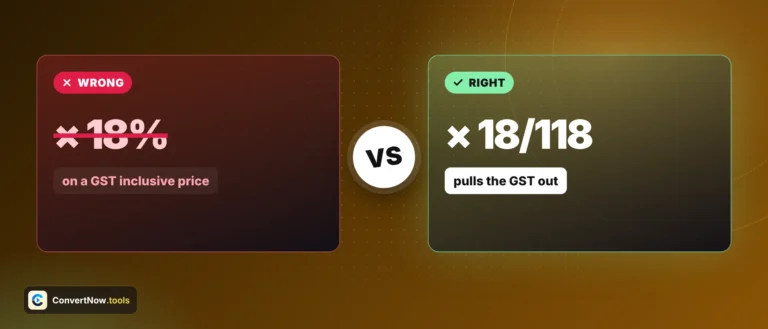
You enter a GST-inclusive amount, a price that already has tax baked in. The base amount is the inclusive total divided by one plus the rate over 100, not a simple subtraction, since the tax itself was calculated on the base, not on the inclusive total.
Tax amount only
Uses the same base times rate over 100 formula as Add GST, but the display only shows the tax figure itself rather than a running total, useful when you just need the tax line for a ledger entry.
// add mode, adapted from the tool source
base = amt;
tax = amt * rate / 100;
total = amt + tax;
// remove mode, extracting base from an inclusive price
total = amt;
base = amt / (1 + rate / 100);
tax = total - base;
// CGST/SGST split for intra-state supply in India
cgst = tax / 2;
sgst = tax / 2;
Worked example: a base amount of 1,000 rupees at the 18 percent slab. Add mode gives a tax of 180 rupees and a total of 1,180 rupees. Because CGST and SGST split the tax evenly under India's intrastate supply rule, that 180 rupees becomes 90 rupees CGST, Central GST, and 90 rupees SGST, State GST. If the same total of 1,180 were entered in Remove mode instead, the tool would divide by 1.18 to recover the original base of exactly 1,000, not 1,180 minus 180, which happens to match here only because the numbers are round.
| GST slab | Typical goods and services |
|---|
| 5% | Essentials, most packaged food and medicines |
| 12% | Only a short list of items since 22 September 2025 |
| 18% | Most standard goods and services, the tool's default |
| 28% | Only a short list of items since 22 September 2025 |
| 40% | Luxury and sin goods under GST 2.0 |
CGST and SGST versus IGST is about where the transaction happens, not the tax rate. India's GST law splits tax collection based on whether a sale is intra-state or inter-state. A sale within one state splits the tax evenly between the Central government, CGST, and that state's government, SGST, each getting half the total rate. A sale across state lines instead charges Integrated GST, IGST, the full rate collected by the central government and later apportioned to the destination state. The rate you pay is the same either way, it is only the accounting split that changes. This tool lets you toggle the IGST checkbox to switch between the two views for the same rate.
Currency behavior
INR selected
Shows the CGST and SGST row pair by default, toggleable to a single IGST row via the checkbox, and formats numbers using Indian digit grouping, en-IN locale, so large amounts read as lakhs and crores style groupings rather than Western thousands separators.
Any other currency
The CGST/SGST toggle is hidden and the tool always shows one combined tax row, since the Central-versus-State split is specific to India's tax law and does not apply to a generic value-added or sales tax rate in another country. The underlying add, remove, and rate math stays identical.
Rate slabs from 0% to 40%
Custom rate input
Copy summary to clipboard
Indian digit grouping for INR
All math runs client side with no data sent anywhere. This tool computes standard percentage based tax math and is meant for estimation and learning, not as a substitute for filing software or a tax professional, actual GST compliance involves invoicing rules, input tax credit, and filing requirements this tool does not cover.
Billing tasks this covers
Working out the tax inclusive price to display on an invoice from a quoted pretax cost, reverse calculating the taxable base from a final receipt total, checking that a vendor's CGST and SGST split adds up correctly on a business expense, comparing how much a purchase costs across different GST slabs, and estimating tax liability before finalizing a quote for a client.