
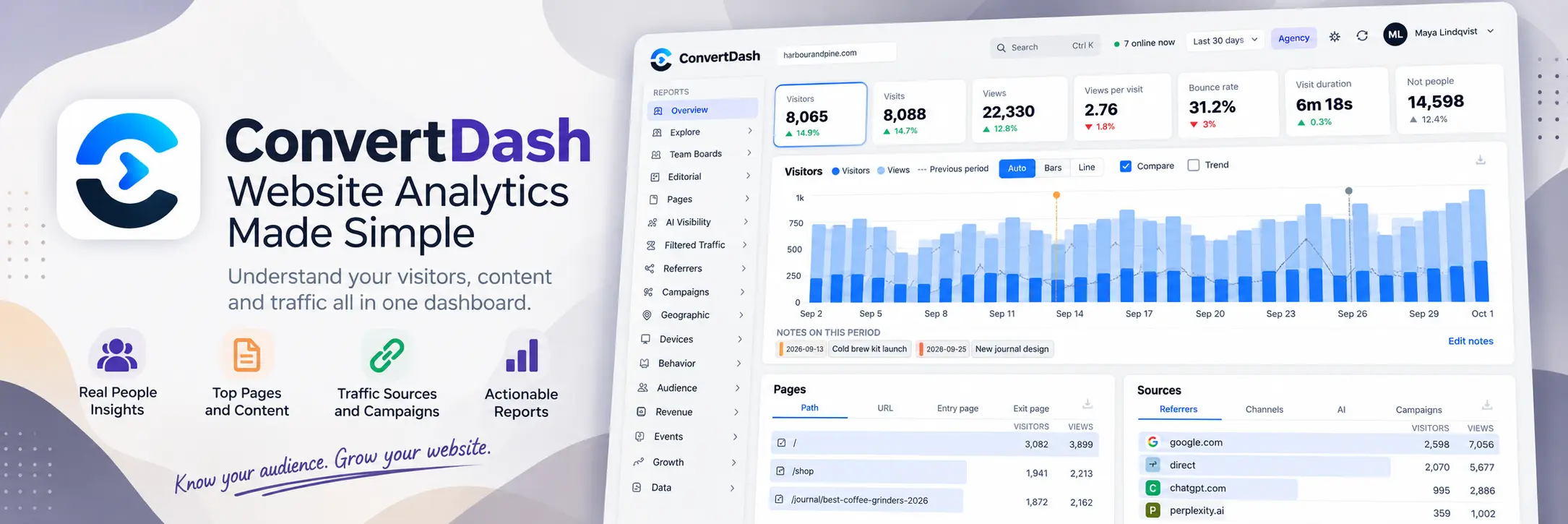

ConvertDash: Cookieless Web Analytics That Counts Real Visitors
ConvertDash is cookieless web analytics that counts real readers, refuses bots, AI crawlers and headless browsers, and tells you exactly what it refused.
ConvertDash is a cookieless web analytics service. You paste one script tag into your site, and ConvertDash gives you 60+ reports on a dashboard we host, or on a server you run yourself. It counts real readers, it refuses bots and AI crawlers, and it lists every refusal by name.
That last part is the point. A visitor number you cannot check is a number you hope is right. This guide explains how ConvertDash works, what it costs, who it suits and where it does not fit.
The short version. ConvertDash sets no cookies, so the analytics itself needs no consent banner. It works on any platform that lets you add a script tag. There is a free plan, a 7 day trial with no card and a self hosted option with no pageview limit. It is licensed software, not open source.
ConvertDash is cookieless web analytics that counts real readers, refuses bots, AI crawlers and headless browsers, and tells you exactly what it refused.
What ConvertDash is: cookieless web analytics explained
Cookieless web analytics measures a site without storing anything on the visitor's device. No cookie, no local storage, no persistent identifier. ConvertDash follows that rule. The visitor identifier rotates every day, IP addresses are never stored, and Do Not Track and Global Privacy Control are honoured by default.
The only thing ConvertDash keeps in the browser is a random visit hint in session storage. It disappears when the tab closes.
You add the tag once. ConvertDash reads authors, page types, missing pages and site searches from what your pages already say, so there is little to configure. It runs on WordPress, WooCommerce, Shopify, Webflow, Squarespace, Wix, Ghost, Framer, Next.js, Nuxt, Astro, Rails, Laravel, Django and plain HTML.
Why a visitor count full of bots misleads you
Most analytics tools count crawlers, prerenders and headless browsers as people. Your traffic looks bigger than it is, your conversion rate looks smaller, and you never find out why.
ConvertDash takes the opposite view. A dashboard that says 88 visitors and a dashboard that says 88 visitors plus 2,470 refused requests are the same measurement. Only the second one can be checked. Refused traffic is stored as counters, never as a log: a date, a kind, a name, a page and a number. None of it reaches your visitor count.
Expect your numbers to be lower than Google Analytics. The Filtered Traffic reports show exactly what the difference is made of.
Try ConvertDash free
Seven days of everything, no card. Paste one tag and learn this week whether your traffic is what you thought it was.
Start free for 7 daysSee plans and pricesHow ConvertDash tells people from bots
Nothing here needs a cookie or a fingerprint. It is all things a browser does that a script does not bother to fake. ConvertDash runs four tests, cheapest first.
- It says what it is. Most bots, AI crawlers and scanners announce themselves. They are refused by name and filed under what they are. A claimed identity is checked against published ranges or reverse DNS, and impostors show as Fake.
- It sends browser headers. Half of automated traffic copies a current Chrome agent string. It rarely copies everything else a browser sends with it.
- Somebody was there. Did the page paint, was it shown, and did a person move, tap, type or scroll, or stay two seconds with the tab in front? A headless browser renders. It does not fidget.
- It is not a data centre. A browser on a cloud address that claims to be a MacBook and never touches the page is not a reader. iCloud Private Relay visitors are always counted, and so are VPN visitors who scroll or tap.
Here is one day on a small site, as the Filtered Traffic reports show it.
| What arrived | Filed as | That day |
|---|---|---|
| A person reading a page | Visitor | 88 |
| ChatGPT fetching a page because somebody asked a question | AI assistant fetch | 142 |
| GPTBot, ClaudeBot, CCBot, Bytespider crawling the web | AI crawler | 1,320 |
| Googlebot, Bingbot, Applebot | Search engine | 410 |
| Ahrefs, Semrush, Moz, SimilarWeb | SEO tool | 260 |
| curl, python requests, a headless Chrome | Script or headless | 178 |
What you can see in the ConvertDash dashboard
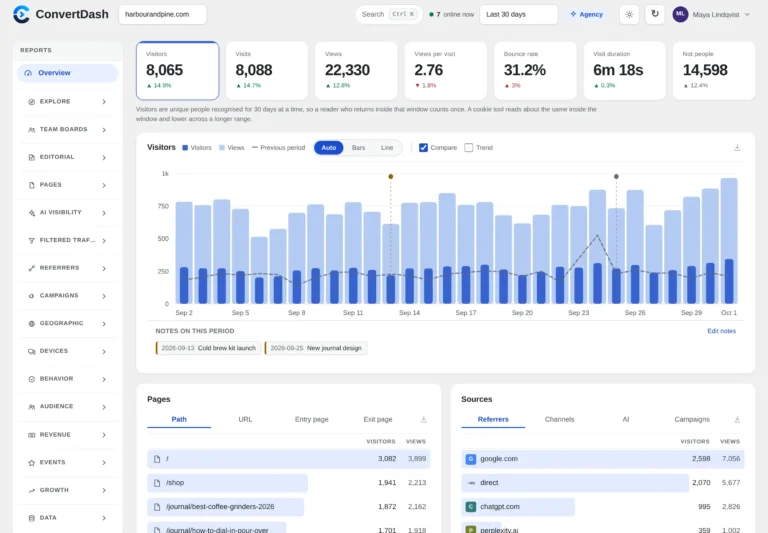
Every section opens on a Glance screen with tiles, a trend and ranked lists. Then you drill in. Filters apply across every report, so one filter answers a question everywhere at once. The 60+ reports sit in 14 sections.
- Explore: one board for every question, with saved cards, comparison to the previous period, attribution and live now.
- Editorial: authors, posts, content types and what each brings in.
- Pages, Referrers, Campaigns: top, landing and exit pages, search and social, UTM source, medium and campaign.
- AI Visibility and Filtered Traffic: assistants, pages they cite, crawlers, and every machine refused by name.
- Geographic and Devices: countries, languages, browsers, systems and screens.
- Behavior and Audience: goals, funnels, journeys, retention, segments and cohorts.
- Revenue and Events: revenue by channel, landing page, campaign, author and assistant, plus clicks, missing pages and site search.
- Growth and Data: growth tracking, AI insights and exports in CSV, TSV, JSON and NDJSON.
There is more. ConvertDash offers light and dark themes, notes on the chart, custom date ranges in your timezone, shared read only dashboards with a password and an expiry, and weekly email summaries. Revenue is read from WooCommerce, Shopify or any checkout, and each order counts once. Sources, channels and campaigns belong to the first pageview of a visit, so an internal click never shows as direct.
AI crawlers and AI assistants
Most tools mix these two up, and they are different things. A crawler reads your site because its owner wants the whole web. An assistant reads it because a person asked a question. There is a human behind the second one, so ConvertDash gives it its own AI Visibility reports. A machine did the reading, so it never lands in your visitor count.
ConvertDash recognises twenty one assistants by referrer and by utm source. The AI Overview report shows share of voice by assistant, week by week. Crawl to Referral shows, page by page, how often the models fetch it and how often an assistant then sends a person. Crawler Analytics includes a robots.txt helper and an llms.txt starter.
One honest limit: assistants do not pass the question that was asked. What can be read is the referrer host and path, and nothing more.
Watch ConvertDash in action
Set up ConvertDash with one tag
Sign up, add your site and paste the tag it gives you inside the head of every page. No plugin is needed. Then press Test from my browser to see your own visit arrive, or Check installation to have the dashboard look for problems.
<script defer data-no-optimize="1" data-no-defer="1" data-cfasync="false" nowprocket
        src="https://analytics.convertnow.tools/cd.js?k=YOUR_SITE_KEY"></script>
The extra attributes stop LiteSpeed Cache, WP Rocket, SiteGround Optimizer and Cloudflare Rocket Loader from delaying or rewriting the tag. Platform by platform steps are in the ConvertDash documentation.
ConvertDash free plan, trial and plans
Every plan has all 60+ reports. You start with seven days of everything and no card. After that the account moves to the free plan, which keeps collecting for as long as you like.
| Plan | Sites | Hosted allowance | Good for |
|---|---|---|---|
| Free | 1 | 10,000 pageviews a month, 30 days of history | One small site |
| Pro Single | 1 | 100k pageviews a month | One site, every report |
| Pro Power | 5 | 1M pageviews a month | A handful of sites on one screen |
| Agency | Unlimited | 5M pageviews a month | Client work, white label, team roles |
| Lifetime, self hosted | Unlimited | No pageview limit | Your own server, one payment |
Hosted pageviews are a soft allowance. Go over and nothing stops counting. We email you at 80 and 100 percent. Current prices load on the ConvertDash page, and every plan has a 14 day refund.
Hosted or self hosted
You do not have to choose. One yearly key works on our hosted service and on your own servers, even at the same time. Hosted is the easy route: we run the servers and you paste one tag. Self hosted runs from our Docker images, needs about 1 GB of memory and has no pageview limit on any plan. Your visitor data never leaves your machine.
The Lifetime licence is self hosted only. It includes every feature, unlimited sites and two servers, such as production and staging.
ConvertDash vs the ConvertNow Analytics plugin
We make two products, and they suit different sites. The ConvertNow Analytics plugin is free and lives inside WordPress. ConvertDash works on any platform.
| ConvertNow Analytics | ConvertDash | |
|---|---|---|
| Platforms | WordPress only | Any site that accepts a script tag |
| Where you read it | Inside WordPress | Its own dashboard |
| Where data lives | Your WordPress database | Our servers, or yours if self hosted |
| Price | Free | Free plan, then paid plans |
| Revenue and Explore board | Not included | Included |
Who ConvertDash suits and where it falls short
ConvertDash suits publishers who want a bot free count, agencies that report to clients, shops that want revenue next to traffic, and anyone who wants to see which AI assistants send readers. It also suits teams that want analytics on their own server.
It has limits. The code is licensed, not sold, so you cannot change it. Hosted data lives on our servers, because your readers' browsers send it there. Unique visitors are counted per day because the identifier rotates daily by default. And on cookies, a banner is generally needed when a tool stores or reads information on a device for a non essential purpose. ConvertDash stores nothing for analytics, but your duties depend on where you and your visitors are. The ICO guidance on cookies is a readable summary. This is not legal advice.
Reading your first week with ConvertDash
The main guide explains how the service works. This section covers what to do once the tag is live. A few habits in the first seven days make it far more useful than a quick glance at the home screen.
What should you expect from ConvertDash on day one?
Lower numbers than your old tool. That is normal. Take the sample day from the guide: 88 visitors and 2,470 refused requests. That adds up to 2,558 requests, and 96.6 percent of them were machines. A tool that counts everything would have shown a very different story, and ConvertDash shows both sides so you can check the sum.
| Day | What to do in ConvertDash | What you learn |
|---|---|---|
| Day 1 | Press Test from my browser and watch your own visit arrive | The tag works |
| Day 2 | Open the Filtered Traffic reports | How much machine traffic was refused |
| Day 3 | Open the Editorial and Pages reports | Which authors and posts bring readers |
| Day 5 | Check AI Visibility | Which assistants send people, and which crawlers only read |
| Day 7 | Compare ConvertDash with your old tool | Why the totals differ and by how much |
Does the ConvertDash free plan cover your traffic?
The free plan allows 10,000 pageviews a month. Divide that by 30 days and you get about 333 pageviews a day. A site with 150 daily visitors who read 2 pages each makes 300 pageviews a day, or 9,000 a month, which fits. At 500 pageviews a day you reach 15,000 a month and ConvertDash moves you toward Pro Single, which includes 100k. Hosted allowances are soft, so counting never stops mid month.
- Under 333 pageviews a day: the free plan is enough.
- Between 333 and 3,333 pageviews a day: Pro Single covers one site.
- Several sites on one screen: Pro Power covers five.
- Client work with team roles: look at the Agency plan.
- No pageview limit wanted: ConvertDash self hosted runs from Docker images.
How do you compare ConvertDash with your old numbers?
Run both tools for two weeks. Write down daily totals in a sheet. Expect your old tool to show more, because it counts crawlers and prerenders. The gap is not an error. Open the Filtered Traffic reports and match the difference against the named refusals. If the gap is far bigger than the refused total, check that your tag sits in the head of every page.
A fair test
Compare the numbers with a tool that sets cookies only after you account for visitors who decline consent. Otherwise you compare two different groups of people.
What can you share from the dashboard?
Not everyone on your team needs a login. The dashboard can create shared read only views with a password and an expiry date, so a client sees the numbers for a month and then the link dies. Weekly email summaries do the same job without anyone opening a browser. Both are useful in the first month, when stakeholders keep asking whether the new tag works.
If the numbers look empty, check three things in order. Is the tag inside the head of every page? Is an optimiser plugin delaying scripts? Did you press Check installation? Most gaps come from the second one.
Is ConvertDash the right fit for your site?
Pick it if you want a bot free count, AI traffic reports and a hosted or self hosted choice. Pick something else if you need ad attribution inside Google Ads. Our comparison of seven analytics tools sets ConvertDash beside the others, and the free WordPress plugin guide covers the sister product. Whatever you decide, give it a full week before you judge it.
| In this guide |
|---|
| What ConvertDash is |
| Why a visitor count full of bots misleads you |
| How ConvertDash tells people from bots |
| What you can see in the dashboard |
Keep reading
ConvertNow Analytics guideThe free WordPress analytics plugin.ConvertDash pagePlans, pricing and self hosting.ConvertNow Analytics pageEvery plugin feature in one place.
Frequently asked questions
What is ConvertDash?
ConvertDash is cookieless web analytics. You add one script tag to your site and get 60+ reports on a hosted dashboard or on your own server. It counts real readers and lists the bots and AI crawlers it refuses.
Do I need a cookie banner for ConvertDash?
Not for the analytics. ConvertDash sets no cookies and uses no local storage. Your duties still depend on where you and your visitors are, so ask a legal adviser before you remove a banner.
Will my numbers be lower than Google Analytics?
Usually, yes. Most tools count crawlers, prerenders and headless browsers as people. ConvertDash refuses them and lists each one in Filtered Traffic, so you can see what the difference is made of.
Does ConvertDash work on my site?
If you can add a script tag to the head, yes. WordPress, WooCommerce, Shopify, Webflow, Wix, Squarespace, Ghost, Framer, Next.js, Nuxt, Astro, Rails, Laravel, Django and plain HTML all work.
Is there a free plan?
Yes. The free plan covers one site, 10,000 pageviews a month and 30 days of history, hosted. It keeps collecting for as long as you like. There is also a 7 day trial of everything with no card.
Can I self host ConvertDash?
Yes. It runs from Docker images, or on PHP 8.1 or newer with MySQL 8 or MariaDB 10.6 or newer. There is no pageview limit on your own server. A yearly key works hosted and self hosted, and the Lifetime licence is self hosted only.
Can I see or change the code?
No. ConvertDash is licensed, not sold. Without a key an install runs the free rules on your own data with no history limit.
What happens if I stop paying?
Collection continues. A hosted account drops to the free plan, which shows the last 30 days and the core reports. Come back inside the grace window and your history returns.