QR Code Generator URL, WiFi, vCard & More
Generate QR codes for URLs, plain text, email, phone, SMS, WiFi credentials, and vCard contacts. Customise colours, size, and error correction level. Download as PNG instantly, no sign up needed.
Place a photo behind the QR code. It’s automatically dimmed so the code stays scannable — use the slider below to control how much.
Higher = lighter background, easier to scan. Lower = more of the photo shows through.
Add a small logo or icon to the middle of the code. Error correction automatically switches to High so the code still scans with the center covered.
Keep this under 25% for reliable scanning. Larger logos can make the code unreadable.
Seven content types, one ISO/IEC 18004 encoder underneath
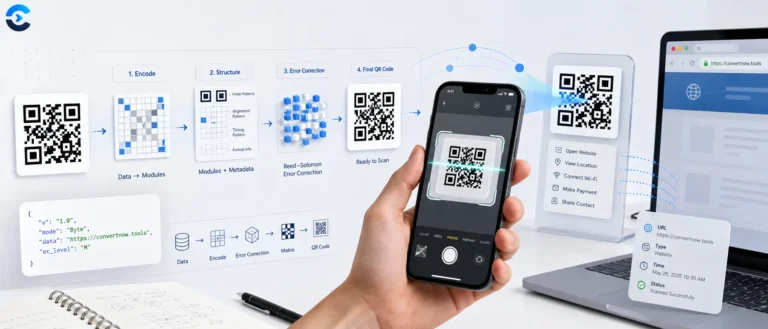
Every QR code this tool produces is generated by the qrcode-generator library, loaded from a CDN as window.qrcode, which implements the ISO/IEC 18004 QR Code specification directly, the module placement rules, Reed-Solomon error correction, and mask scoring are all handled inside that library. This tool’s own code is responsible for one thing the library doesn’t do: turning a form (a URL, a WiFi password, a vCard) into the correctly formatted text payload the encoder expects, then rendering the resulting module matrix onto a canvas with your chosen colors, background image, and logo.
From form fields to a scannable code
WIFI:T:WPA;S:ssid;P:password;H:false;;, a vCard becomes properly escaped VCARD 3.0 text, email becomes a mailto: URI with URL-encoded subject and body.
Error correction levels
| Level | Recovery capacity | When to use |
|---|---|---|
| L | ~7% | Maximum data capacity, clean digital display |
| M | ~15% | General purpose default |
| Q | ~25% | Printed materials that may get scuffed |
| H | ~30% | Any code with a logo overlay, forced automatically |
Higher error correction means more of the grid is spent on redundancy rather than your actual data, which is why a heavily damaged or logo covered code needs a larger version (more modules) to hold the same content than a clean level L code would.
Seven content types
URL, plain text, email, phone, SMS, WiFi credentials, and vCard contact cards, each with its own validation before the encoder runs, so an empty required field is caught before a wasted encode attempt.
PNG and SVG export
PNG comes straight from canvas.toDataURL(). SVG is built independently by the tool itself, walking the same module matrix and emitting one <rect> per dark cell, which is why SVG export doesn’t carry a background photo or logo, those are raster-only features.
Background image and dim overlay
An uploaded photo is cover-fit behind the code, then a white overlay at an adjustable opacity is painted on top before the modules are drawn, keeping enough contrast for the code to still scan reliably against a busy image.
- ISO/IEC 18004, the official QR Code symbology specification.
- qrcode-generator, the library performing the actual encoding and error correction.
- QR error correction overview, explaining the L/M/Q/H levels and Reed-Solomon basis.
What people encode in a QR code
Printing a WiFi QR code for guests instead of writing out a password, putting a vCard code on a business card so a phone scan saves a contact directly, linking a physical flyer or product package to a landing page, generating an SMS or call to action code for a menu or poster, or branding a code with a logo for a marketing campaign while keeping it reliably scannable. The SVG export in particular matters for anything going to print at large size, since it stays crisp at any scale unlike a fixed resolution PNG.
FAQ: QR Code Generator
A QR code (Quick Response code) is a two dimensional barcode that encodes data as a pattern of black and white squares arranged on a grid. Unlike traditional 1D barcodes that store data horizontally in stripes, QR codes use both dimensions and can store significantly more information, typically up to 3,000 bytes. Smartphones read them using the camera sensor to capture the pattern, then decode the position markers (the three square corners), alignment patterns, and the data cells according to the Reed-Solomon error correcting algorithm defined in ISO/IEC 18004. The decoded string is then interpreted as a URL, contact, or other content type.
QR codes use Reed-Solomon error correction to remain scannable even when partially damaged, dirty, or obscured. There are four levels: L (7% of codewords recoverable), M (15%), Q (25%), and H (30%). Higher error correction means more redundant data, which makes the QR pattern denser and harder to scan at small sizes. For printed materials in clean environments, L or M is fine. If you plan to print the QR code on materials that may get worn, wet, or dirty (packaging, outdoor signage, stickers), choose Q or H. If you are adding a logo on top of the QR code, use H to compensate for the covered codewords.
The minimum printable size for reliable scanning depends on the scanner distance and QR version (number of modules). A commonly cited guideline is a minimum of 2 cm × 2 cm for scanning at 20 to 25 cm, scaling proportionally with distance. For a billboard scanned from 10 m, the code needs to be at least 1 m × 1 m. A useful rule of thumb: QR code size = scanning distance divided by 10. This calculator generates QR codes at your chosen pixel size for digital use; for print, ensure the resolution matches your output device (300 DPI for high quality print means a 3cm code needs about 354px).
Standard data types include plain URLs, text strings, email addresses (with optional subject and body), phone numbers, SMS messages, WiFi network credentials, and vCards (contact cards). WiFi QR codes use a special format (WIFI:T:WPA;S:NetworkName;P:Password;H:false;;) that iOS 11+ and Android 9+ can parse to join a network directly. vCard codes follow the vCard 3.0 standard and when scanned prompt the device to save a new contact. Some platforms support additional types like calendar events (VEVENT format) and geographic coordinates, which this generator supports via the URL type using a maps URL.
Yes, you can freely choose the foreground (module) and background colours. The only hard requirement is sufficient contrast between foreground and background for reliable scanning. Most scanners expect dark modules on a light background, but inverted codes (light on dark) work with modern phone cameras if the contrast ratio is sufficient. Avoid low contrast or mid tone combinations like dark grey on dark blue. You cannot use gradients within individual modules (the standard encoder writes solid colour squares), but you can use a solid background and solid foreground of any colours with adequate contrast.
A static QR code encodes your data directly, the URL or contact information is permanently fixed in the pattern. Changing the destination requires generating a new code. A dynamic QR code encodes a short redirect URL (managed by a QR service provider), which forwards to your actual destination. You can then change the destination without changing the printed code. Dynamic codes also provide scan analytics. This generator creates static QR codes, no account needed, no data sent to any server, no tracking, and the codes never expire. Use a dynamic QR service when you need analytics or expect to change the destination.
Common reasons: the code is too small for the scanning distance; the contrast between foreground and background is too low; the code is printed at low resolution and individual modules are blurry; the quiet zone (white border margin) around the code is too narrow (minimum 4 modules wide); the camera lens is dirty or the code is damaged beyond the error correction threshold; or the content type is not supported by the scanning app (some older apps do not decode WiFi or vCard types). Try increasing the size, adding more margin, using high error correction, and testing with multiple scanning apps.
This tool is completely free and requires no account. All QR code generation happens in your browser using the open source qrcode generator library, no data is sent to any server and no information is logged or stored. The generated QR code image can be downloaded directly to your device as a PNG file. There are no usage limits, watermarks, or expiry dates on codes generated here.
From the blog
Notes on images and colour
Format choices, compression tradeoffs and accessible palettes.