Barcode Generator Online Free
Generate barcodes in Code 128, EAN-13, EAN-8, UPC-A, and QR formats. Customize size, colors, and labels. Download as PNG or SVG.
Seven symbologies, one canvas, zero libraries
Most online barcode generators load a JavaScript encoding library. This one does not. Every bar pattern for Code 128, Code 39, EAN-13, EAN-8, UPC-A, ITF-14, and QR Code is built from lookup tables written directly into the tool’s own script and rendered with the Canvas 2D API. Nothing is uploaded, nothing calls out to a barcode API, and the whole thing works offline once the page has loaded.
The linear symbologies and the QR encoder are genuinely different algorithms wearing the same interface. Linear codes translate characters into fixed bar-and-space widths using a table lookup. QR codes are a two dimensional encoding with error correction math layered on top, which is a meaningfully bigger job.
How a linear barcode gets built
That is the exact GS1 check digit algorithm used across EAN, UPC, and ITF-14. It is why you can type 12 digits for a UPC-A and get a scannable 13-character barcode back. The 13th digit is not arbitrary, it is the one value that makes the weighted sum a multiple of ten.
Supported formats and what they’re for
| Format | Data | Typical use |
|---|---|---|
| Code 128 | Full ASCII | Shipping labels, logistics |
| Code 39 | A-Z, 0-9, symbols | Inventory, ID badges |
| EAN-13 | 12-13 digits | Retail products worldwide |
| EAN-8 | 7-8 digits | Small packaging |
| UPC-A | 11-12 digits | Retail products, North America |
| ITF-14 | 13-14 digits | Case and carton packaging |
| QR Code | Text, URLs, up to ~150 chars at version 10 | Mobile scanning, links |
The QR encoder, in short
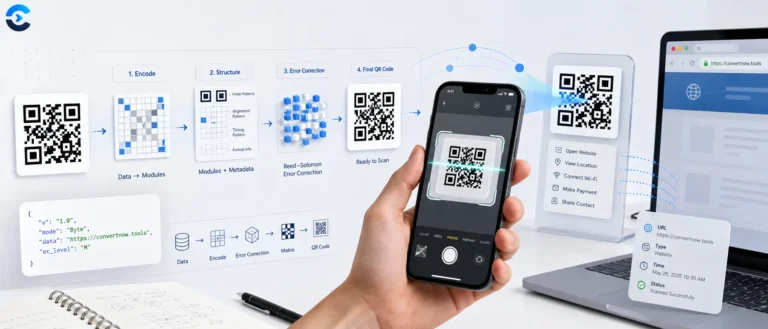
The QR path implements the ISO/IEC 18004 pipeline in miniature: it picks the smallest version (1 through 20) that fits the byte mode payload at error correction level M, builds data codewords with a mode indicator and character count, generates Reed-Solomon error correction codewords over GF(256) using the standard generator polynomial, interleaves data and error blocks, places finder and alignment patterns on the module grid, then tries all eight standard masks and keeps whichever produces the lowest penalty score under the four ISO scoring rules.
Bar width and height
Set independently in pixels, then multiplied by a scale factor before drawing, so you can export a barcode at 1x for screen preview or 4x for a print-ready label without re-encoding the data.
Human-readable label
Drawn below the bars in monospace using the canvas text API. For EAN and UPC types it defaults to the checksum-completed digit string so what a human reads matches what the scanner decodes.
Colors
Bar and background colors are plain canvas fill styles. High contrast between them matters more for scan reliability than any aesthetic choice, low-contrast combinations will fail on real scanners even if they render fine on screen.
- GS1 barcode standards define the EAN, UPC, and ITF-14 symbologies and their check digit rules.
- ISO/IEC 18004 is the QR Code specification covering versions, error correction, and mask patterns.
- Code 128 reference on character sets A, B, and C.
- Reed-Solomon error correction, the math behind QR’s ability to survive partial damage.
Where barcodes get scanned
Printing shelf labels for a small retail inventory, generating ITF-14 codes for outbound cartons, creating Code 39 asset tags for equipment tracking, producing a quick QR code for a product page, or testing how a barcode scanner in a point of sale system handles a specific EAN before committing to printed packaging. Because generation happens instantly on input, it also works well as a scratch tool for verifying a check digit by hand.
Barcode Generator Online Free — Frequently Asked Questions
Code 128 is the safest general choice — it encodes letters and numbers and is scannable by virtually every barcode reader. Use EAN-13 for retail products sold in stores. UPC-A is the US equivalent. ITF-14 is for outer shipping cartons. Code 39 is common in industrial and inventory contexts.
EAN-13 requires exactly 13 digits. The last digit is a check digit calculated from the first 12 using a standard algorithm. If you enter 12 digits, this tool calculates and appends the check digit for you. If you enter all 13, it validates the check digit and warns you if it is incorrect.
The barcode image itself is free to use for any purpose. However, if you need a globally unique product barcode that retailers will accept, you need to purchase a registered GS1 company prefix and product number. A random EAN-13 number will work technically but may conflict with another company’s existing product.
Use 2x scale for standard print quality and 3x or 4x for anything that will be printed at high quality or large size. SVG format is vector-based and scales perfectly to any print size without pixelation, making it the ideal choice for professional use.
No. All barcode rendering happens in your browser using the Canvas API. Your data never leaves your device, which is important if your barcodes encode internal product IDs, serial numbers, or other sensitive identifiers.
From the blog
Notes on images and colour
Format choices, compression tradeoffs and accessible palettes.