About This Tool
How this robots.txt generator builds valid directive blocks, rule by rule
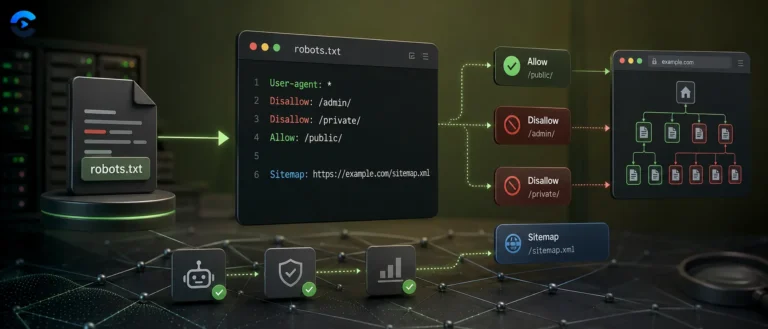
This tool is pure client side, it writes plain text and never touches a network request. Each user agent rule you add becomes an object holding an agent name, a list of disallow paths, a list of allow paths, and an optional crawl delay. On every change, the tool walks the full rule list and reassembles the entire file from scratch, which is why the output box updates instantly as you type.
The directive syntax it follows
Robots.txt has one of the smallest grammars on the web, formalized in 2022 as RFC 9309, the Robots Exclusion Protocol. This generator sticks to the directives that protocol and the major search engines actually support.
User-agent
Names the crawler a rule block applies to. The tool ships a preset list including Googlebot, Bingbot, DuckDuckBot, Baiduspider, YandexBot, several SEO crawlers like AhrefsBot and SemrushBot, and AI crawlers including GPTBot and anthropic-ai, plus a free text field for any custom agent name and the wildcard *.
Disallow
One path per line, written exactly as typed into the output. An empty Disallow value means allow everything for that agent, which is what the Allow All preset produces.
Allow
Optional, used to carve out an exception inside a broader Disallow, for example allowing a single AJAX endpoint inside an otherwise blocked admin folder.
Crawl-delay and Sitemap
Crawl-delay is written per rule block if you set it, though Google ignores this directive entirely, it is honored by Bing and some others. Sitemap is written once, globally, at the end of the file regardless of how many user agent blocks exist above it.
// generate(), simplified from source
lines.push(‘User-agent: ‘ + (rule.agent||‘*’));
rule.disallow.forEach(function(p){ lines.push(‘Disallow: ‘ + p); });
rule.allow.forEach(function(p){ lines.push(‘Allow: ‘ + p); });
if(rule.crawlDelay){ lines.push(‘Crawl-delay: ‘ + rule.crawlDelay); }
// sample output for the WordPress preset
User-agent: *
Disallow: /wp-admin/
Disallow: /wp-includes/
Allow: /wp-admin/admin-ajax.php
The six built-in presets
| Preset | What it sets up |
|---|
| Blank | A single empty rule for User-agent * with nothing disallowed. |
| Allow all | User-agent * with an empty Disallow, permitting the entire site. |
| Block all | User-agent * with Disallow: /, blocking the entire site. |
| WordPress | Blocks /wp-admin/, /wp-includes/, plugin and cache folders, cgi-bin, trackback and xmlrpc.php, while allowing the admin-ajax.php endpoint. |
| E-commerce | Blocks cart, checkout, account, order, admin, tmp, search and tag paths, the pages that add no unique indexable value. |
| Block AI crawlers | Adds a separate Disallow: / block for GPTBot, CCBot, anthropic-ai, Google-Extended, FacebookBot and Omgilibot, each as its own named user agent rule. |
Robots.txt is a request, not a lock. The protocol is voluntary. Well behaved crawlers honor it, but nothing stops a scraper from ignoring the file outright, and it does not prevent a URL from being indexed if other pages link to it, it only stops crawling. If you need a page to genuinely stay out of search results, pair this with a noindex meta tag or an authentication wall, disallowing a page in robots.txt while it is also linked elsewhere can even backfire, since Google may still index the URL with no description because it was blocked from reading the page.
Validation and export
Live validation
The tool checks that at least one User-agent line exists and that every Disallow or Allow path begins with a forward slash, flagging an error or warning banner immediately below the output box.
Copy and download
A copy button uses the Clipboard API with a manual textarea fallback for older browsers, and a download button saves the exact output as robots.txt via a Blob and object URL, ready to drop at your site root.
Pure client-side text generation
RFC 9309 directive syntax
One file per site root, always
Robots protocol references
- RFC 9309 is the formal, current specification for the Robots Exclusion Protocol.
- Google’s robots.txt introduction explains how Googlebot specifically interprets each directive, including its stance on crawl delay.
- robotstxt.org is the original informal home of the standard, predating the formal RFC by two decades.
Crawl control in practice
Setting up a fresh WordPress install’s crawl rules in under a minute, blocking checkout and account paths on a new storefront before launch, deciding whether to let AI training crawlers like GPTBot access your content, and generating a quick block-everything file for a staging subdomain that should never appear in search results.