Combine Strava Activities or Merge Two Garmin Activities
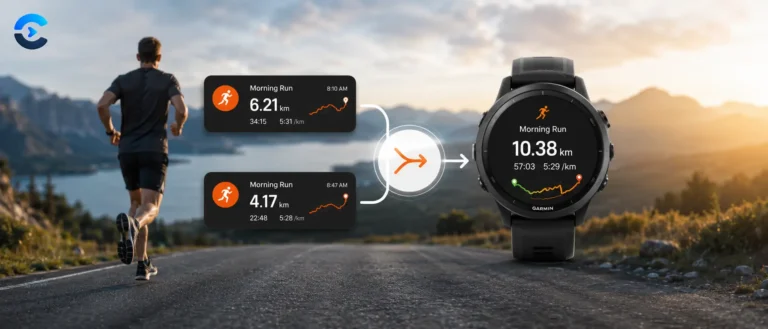
Accidentally stopped your Garmin, Wahoo, or Strava recording mid-ride or mid-run? This tool lets you combine Strava activities, or the underlying FIT files from any device, into a single continuous activity, with correct combined distance, time, and heart rate, entirely in your browser. Nothing is uploaded to any server.
Click to choose files, or drag and drop your Strava/Garmin .fit, .gpx, or .tcx files here
Files stay on your device. Nothing is uploaded.
Use the arrows above to set which activity is first, second, and so on. Your actual GPS and heart rate data will always play back in real chronological order, this setting controls lap order and which segment’s stats are counted first.
Leave blank to use the default pattern: ActivityType_DDMMYY_All.<ext>. The output format matches your input files, all FIT stays FIT, all GPX stays GPX, all TCX stays TCX, and mixed formats are combined and exported as GPX for maximum compatibility.
How this activity file combiner merges split FIT, GPX, and TCX files without breaking your stats
If your watch or bike computer ever dies mid ride, gets paused by accident, or restarts, you end up with two or three separate activity files for what was really one continuous workout. Uploading them separately to Strava or Garmin Connect splits your stats and duplicates the activity. This tool reads the actual files, whether that’s Garmin’s binary FIT format or the XML based GPX and TCX formats, stitches the recorded data together in chronological order, recalculates the summary totals from scratch, and hands you back one file in the right format.
Every byte of parsing, merging, and rebuilding happens in your browser using the File and Blob APIs. Files never leave your device, there is no upload endpoint anywhere in this tool.
FIT is a binary protocol, not a text format
Garmin’s FIT format, Flexible and Interoperable Data Transfer, is a compact binary encoding defined by Garmin’s own FIT SDK. Unlike GPX or TCX, there’s no XML to read with a DOM parser, every byte has a defined meaning that the tool has to walk manually.
That 16-entry lookup table and the nibble-at-a-time shifting is the CRC-16 algorithm specified exactly in Garmin’s FIT protocol document, not a generic checksum, the polynomial and table values have to match byte for byte or every FIT reading app will flag the file as corrupt.
Merging the FIT stream: what actually gets recalculated
Concatenating raw bytes from two FIT files would not work, each file’s distance field starts back at zero, timestamps aren’t continuous, and there are two separate session and activity summary messages competing for the same slot. The merge engine has to rebuild those summaries from the combined data rather than just gluing files together.
Running distance offset
Each file’s record distance values get shifted forward by the cumulative distance of every file merged before it, so the combined track never resets to zero mid-activity. The offset accumulates in raw centimetre units, since FIT stores distance as an unsigned 32-bit integer scaled by 100.
Time-weighted average heart rate
A simple average of each file’s average heart rate would be wrong if the files cover different durations. The merge weights each file’s average HR by its timer time in seconds before summing, so a 10-minute segment doesn’t skew the combined average as much as a 90-minute one.
Records and events from every file get pooled into single arrays, then sorted by timestamp so the final chronological order is correct even if you added the files out of sequence. Laps get renumbered sequentially starting at zero, and their message index and distance fields are corrected the same way record distances are. Bounding box fields, the northeast and southwest corners used for map previews, take the max and min across every file so the combined route’s full extent is captured.
Rewriting the file: local message type slots
The FIT spec allows only 16 concurrent local message types active at once, local type numbers 0 through 15, each pointing to whichever definition was most recently declared for that slot. Writing the merged file back out means reemitting a definition record every time a slot’s field layout changes.
This is why the writer tracks a rotating pool with round robin reuse rather than assigning one slot per message type permanently, a real activity file mixes record, lap, session, and event messages throughout, and 16 slots run out fast if each type claimed one forever. Reemitting a definition only when a slot’s signature actually changes keeps the output file compact.
GPX and TCX: XML parsing and the distance recalculation
GPX and TCX are both XML, so the tool uses the browser’s built in DOMParser rather than hand-rolled byte parsing. GPX stores heart rate and cadence inside an <extensions> block whose tag names vary by exporter, sometimes hr, sometimes namespaced as gpxtpx:hr, so the parser searches by local tag name rather than assuming one fixed namespace prefix. TCX stores distance and lap summaries explicitly, but when trackpoints from multiple files are merged into one continuous track, those summaries no longer match, so the tool recalculates total distance from scratch using the haversine formula between every consecutive pair of coordinates.
The haversine formula computes great circle distance across a sphere, the standard method for short range GPS distance calculation, accurate to within about 0.5 percent for distances typical of a single workout since it doesn’t account for Earth’s slight ellipsoidal flattening, a correction that only matters at much larger distances.
Sport detection and file ordering
| Situation | What the tool does |
|---|---|
| All files same format | Native merge: FIT stays FIT, GPX stays GPX, TCX stays TCX |
| Mixed formats | Falls back to a universal point-level merge, exported as GPX |
| Different sport codes detected | Merges anyway, using the last file’s activity type, and warns you to double check the result |
| Unrecognized sport or sub-sport code | Shows the file’s raw numeric code rather than guessing a label |
File order is fully manual, you control it with up and down controls in the file list, since the tool has no way to know which segment actually happened first if your device clock was wrong or two files share overlapping timestamps. Sub sport codes, when present, take priority over the general sport code for the activity label, since a sport like Rock Climbing covers both bouldering and roped climbing at the general level, and the sub sport is what actually distinguishes them.
- Garmin FIT SDK, Protocol Specification, the official binary format documentation this parser and writer implement.
- GPX 1.1 Schema, topografix.com, the XML schema this tool reads and writes for GPX files.
- Garmin Training Center Database XML Schema (TCX), the schema behind TCX import and export.
- Haversine formula, background on the great-circle distance calculation used for GPX and TCX merges.
This tool processes fitness and location data, not personal medical information, but it’s built with the same client side guarantee as every other tool on this site: your files are parsed, merged, and rebuilt entirely in your browser and are never uploaded to a server. After downloading the combined file and confirming it looks correct, consider deleting the original split activities from Strava or Garmin Connect to avoid duplicate entries in your training history.
Why athletes merge activity files
Rejoining a long ride or run that got split across two files by a device restart or accidental pause, merging a warm up recorded on a phone app with the main workout recorded on a watch, combining GPS only GPX tracks from an older device with heart rate data from a separate TCX export, and cleaning up activity history before it goes into a training log so total distance and time reflect one real session instead of several fragments.
FAQ: Combine Strava Activities
Export the file for each split activity, FIT, GPX, or TCX, from Strava’s activity menu or straight from Garmin Connect, upload both into this tool, set the order if needed, and click Combine Strava Activities. Download the merged file, then upload it back to Strava as a new activity and delete the two originals to avoid double-counting your stats.
It supports the three formats Strava accepts for manual upload: FIT, GPX, and TCX. If every file you add is the same format, the combined file comes out in that same format, FIT stays FIT, GPX stays GPX, TCX stays TCX. If you mix formats, say a FIT file from your watch and a GPX file exported from Strava, the tool automatically adjusts and combines them anyway, exporting the result as GPX, since that’s the format every platform reads without issue.
Yes. FIT, GPX, and TCX are all standardized formats used by Garmin, Wahoo, Suunto, COROS, Polar, and most GPS sports devices, so files from different brands can generally be combined regardless of which of the three formats each one exports in. What matters more than brand is activity type, combining a cycling file with a cycling file works best.
It’s kept as a real pause rather than deleted. The combined file’s total elapsed time spans from the start of your first activity to the end of your last one, including the gap, while total moving (timer) time only counts the time you were actually recording. This mirrors what actually happened and matches how Garmin’s own auto-pause feature represents stopped time.
There’s no hard limit built into the tool, you can add two, three, or more files. In practice most people are combining two files from a single accidentally-split workout, but the merge logic works the same way for any number of segments.
Your GPS track, heart rate, and other point-by-point data are always played back in true chronological order based on each record’s real timestamp, so the map and graphs are always correct regardless of upload order. The order you set with the up and down arrows controls which segment is labeled Lap 1 versus Lap 2 (FIT files), and which segment’s distance is treated as the base that later segments are added on top of.
The tool will show a warning if it detects mismatched activity types, but it won’t stop you from combining them. That said, most training platforms expect one sport per activity, so combining a run with a ride will likely produce an odd-looking result in Garmin Connect or Strava. This feature is really meant for combining two segments of the same workout.
You can type your own file name before downloading. If you leave it blank, it defaults to a pattern like Cycling_040826_All.fit (or .gpx / .tcx, matching the output format), made up of the detected activity type, today’s date in DDMMYY format, and “All” to indicate it’s the combined file. The correct file extension is always added automatically if you leave it off.
Yes. The entire merge happens locally in your browser using JavaScript, whether the files are FIT, GPX, or TCX, your GPS coordinates and heart rate data are never uploaded to a server, logged, or stored anywhere. Everything is discarded the moment you close or refresh the page.
From the blog
The research behind the numbers
Where these formulas came from and what the studies actually showed.