
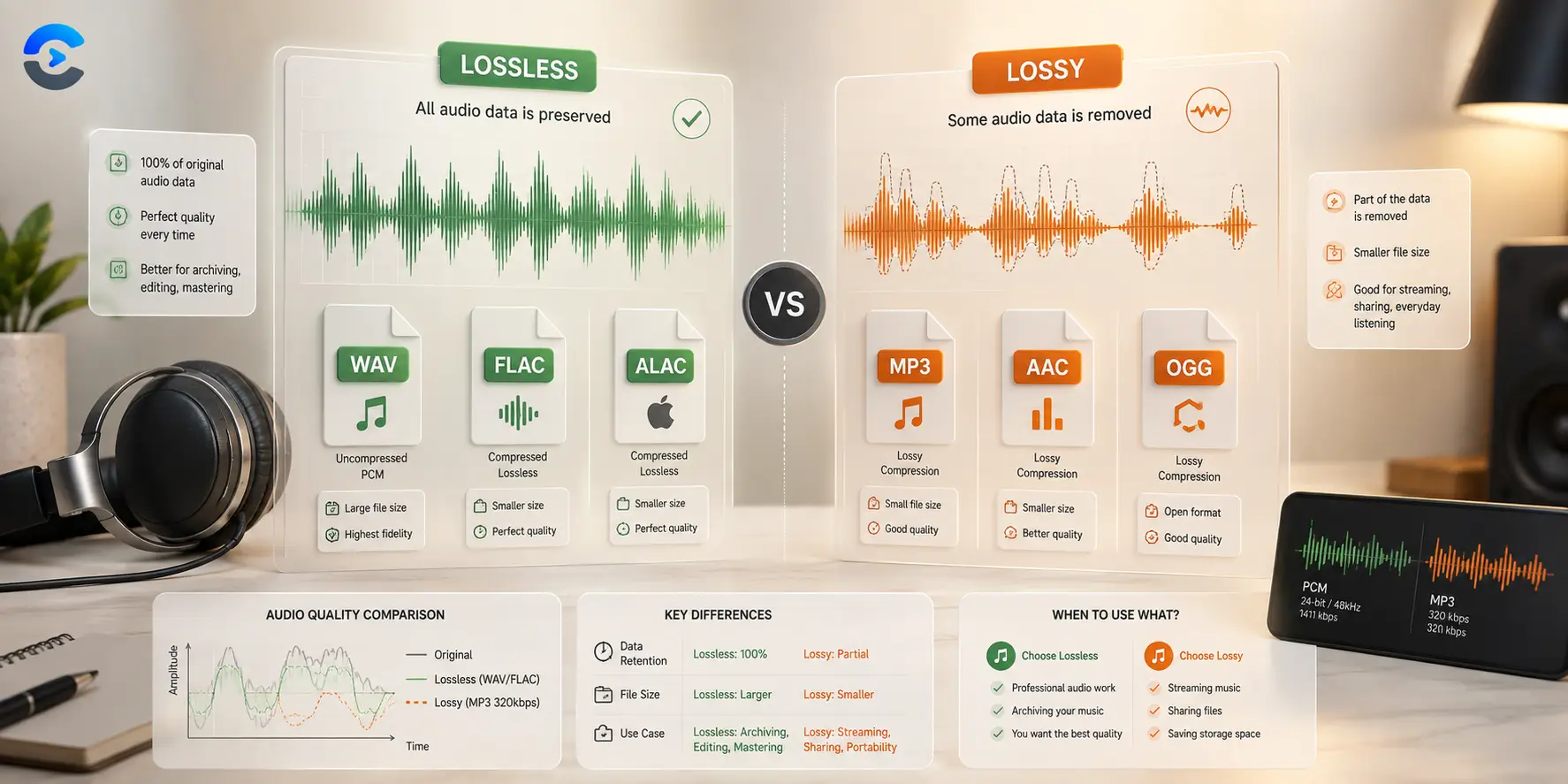

When Do You Need Lossless Audio Instead of MP3
You need lossless audio, such as WAV or FLAC, when you are archiving a master recording or running audio through multiple rounds of professional editing, since repeated processing on a compressed file compounds quality loss. For everyday listening, podcasts, and most streaming, a well encoded MP3 sounds indistinguishable from the source to nearly everyone. The honest answer is to match the format to the job rather than defaulting to one format for everything.
When do you need lossless audio and when MP3 is enough
MP3 works by throwing away audio detail that most human ears cannot easily perceive, which is how it shrinks a file so dramatically. That tradeoff is fine for a single playback pass, but it becomes a problem the moment you edit, re encode, or stack effects on that same file repeatedly, since each pass can throw away a little more.
Casual listening and podcasts
If the final destination is a phone, a set of earbuds, or a car stereo, a properly encoded MP3 at a reasonable bitrate is genuinely fine. Podcasts in particular are almost entirely speech, and speech survives lossy compression extremely well, so there is little practical reason to distribute a podcast as an uncompressed file.
Archival masters and editing chains
A studio recording session, a voiceover master, or any file you expect to reopen and edit later should stay lossless. WAV stores audio with no compression at all, while FLAC compresses the file size without discarding any audio data, so both preserve every detail for future edits. Starting from a lossy file and editing it repeatedly bakes in artifacts that get progressively worse.
You need lossless audio, such as WAV or FLAC, when you are archiving a master recording or running audio through multiple rounds of professional editing, since repeated processing on a compressed file compounds quality loss.
A side by side comparison
| Format | Typical file size | Best use |
|---|---|---|
| MP3 | Smallest, roughly a tenth of WAV | Casual listening, podcasts, streaming |
| FLAC | Medium, roughly half of WAV | Archiving without full uncompressed size |
| WAV | Largest, fully uncompressed | Studio masters, active editing sessions |
Audio Converter
Move between MP3, WAV, FLAC, and more with the Audio Converter, right in your browser.
Open the Audio ConverterMP3 to WAV Converter
Need a lossless copy for editing? Use the MP3 to WAV Converter to get a file your editing software can work with cleanly.
Open the MP3 to WAV ConverterWAV to MP3 Converter
Once editing is finished, shrink your final master down for distribution with the WAV to MP3 Converter.
Open the WAV to MP3 ConverterA short checklist for choosing a format
- Keep your original recording session as WAV or FLAC before you do any editing.
- Export a final MP3 copy only after all editing is finished, not before.
- Use MP3 for anything meant purely for casual playback, such as a finished podcast episode.
- Convert between formats as the situation changes instead of picking one format for every file you own.
Lossless or MP3: the quick rule
Reach for lossless audio when you are archiving a master or editing repeatedly, and reach for MP3 when the file is meant purely for listening. The Audio Converter makes moving between the two a quick step rather than a permanent decision.
When Do You Need Lossless Audio: Real Numbers and Real Situations
The post above gives the rule. Here is the detail behind it, with file sizes you can check yourself, so you can decide when do you need lossless audio for your own files.
What the file sizes tell you about when do you need lossless audio
CD quality audio runs at 1,411 kbps, which works out to about 10.6 MB per minute. A three minute song is roughly 31.8 MB as WAV. The same song at 320 kbps MP3 is about 7.2 MB, and at 128 kbps it is about 2.9 MB. Storage is cheap, so size alone rarely answers when do you need lossless audio. Quality risk does.
| Format and setting | Per minute | Three minute track | Verdict on when do you need lossless audio |
|---|---|---|---|
| WAV, 44.1 kHz, 16 bit | 10.6 MB | 31.8 MB | Yes, masters and editing are when do you need lossless audio cases |
| WAV, 48 kHz, 24 bit | 17.3 MB | 51.8 MB | Yes, film and studio sessions settle when do you need lossless audio |
| MP3, 320 kbps | 2.4 MB | 7.2 MB | No, final delivery answers when do you need lossless audio with a no |
| MP3, 128 kbps | 0.96 MB | 2.9 MB | No, speech never triggers when do you need lossless audio |
Situations where the answer to when do you need lossless audio is yes
- You are handing a mix to a mastering engineer. That is a clear case of when do you need lossless audio, so send WAV or FLAC, never MP3.
- You plan to cut, layer or process the file more than once. Each lossy pass adds artifacts.
- You record voiceover for video at 48 kHz. Keep that master, because film work expects it.
- You sample or chop audio for music production, where lossy flaws get stretched and amplified.
- You archive family recordings, interviews or a band session you cannot record again. For archives, when do you need lossless audio is answered at the moment of recording.
- You listen on a quiet home setup with good speakers and want zero doubt. This is the weakest reason when do you need lossless audio comes up, but it is a fair one.
When do you need lossless audio less than you think
Be honest about the other side. If a file only travels to a phone, a car or a podcast feed, a 128 to 192 kbps MP3 handles speech cleanly, and 256 to 320 kbps handles music. Sending a lossless file there only burns data. Asking when do you need lossless audio for a finished podcast usually ends with the answer no, because the real quality work happened before export.
A simple habit solves most cases. Keep the lossless master in one folder. Export the MP3 from that master whenever you need a copy. Never export an MP3 from another MP3. If you need the compressed copy, the audio converter can create it from your WAV or FLAC in the browser, and the audio compressor can shrink it further.
One trap to avoid
Converting an MP3 to WAV does not bring back lost detail. It only wraps the same data in a bigger file. So when do you need lossless audio? At the start, when you record, not after the fact.
More questions on when do you need lossless audio
Is FLAC better than WAV? Same audio, smaller file, which matters when do you need lossless audio and storage both count. FLAC typically lands near half the size of WAV, and it supports tags such as artist and album more neatly. Many people store archives as FLAC for that reason.
Does a higher bitrate fix editing damage? No. A 320 kbps MP3 is still lossy, so the edit chain question of when do you need lossless audio stays the same.
Can I tell the difference in a blind test? Many listeners cannot at 256 kbps or above on ordinary gear. Trained ears on good equipment sometimes can, which is one more input into when do you need lossless audio for critical listening.
| # | Key takeaway |
|---|---|
| 1 | Keep your original recording session as WAV or FLAC before you do any editing. |
| 2 | Export a final MP3 copy only after all editing is finished, not before. |
| 3 | Use MP3 for anything meant purely for casual playback, such as a finished podcast episode. |
| 4 | Convert between formats as the situation changes instead of picking one format for every file you own. |
FAQ: When Do You Need Lossless Audio Instead of MP3
When do you need lossless audio instead of a compressed file?
You need lossless audio when archiving a master recording or running a file through multiple rounds of professional editing, since compressed formats lose a little detail with each additional pass of processing.
Can most people actually hear the difference between MP3 and WAV?
At a reasonable bitrate, most listeners cannot reliably tell a well encoded MP3 apart from a WAV file during normal playback on everyday speakers or earbuds.
Is FLAC the same as WAV?
No, FLAC compresses the file size without discarding any audio data, while WAV stores the audio completely uncompressed, so FLAC is smaller but both preserve full quality.
Should podcasts be distributed as WAV files?
No, podcasts are almost entirely speech, which survives MP3 compression very well, so distributing a podcast as an uncompressed file mostly adds file size without a meaningful quality benefit.
Why does editing a compressed file repeatedly cause problems?
Each time a lossy file is re encoded, a small amount of additional detail is discarded, and those small losses stack up over multiple editing passes, gradually degrading the audio.
How do I convert an MP3 to WAV for editing?
Upload the MP3 to the MP3 to WAV Converter, and it produces an uncompressed WAV file that your editing software can process without adding further compression artifacts.
What is the best format for final distribution after editing?
Once editing is complete, converting the finished WAV or FLAC master down to MP3 with the WAV to MP3 Converter is usually the right final step for streaming or casual listening.
Sources and further reading
- MDN: Lossless compression: the core idea in one page.
- FLAC on Wikipedia: the most common lossless audio format.

