

How I Built the Bot Filter in ConvertNow Analytics
Most analytics tools count every request that looks like a page view. That sounds fine until you check who made those requests. On convertnow.tools, most of them were never people.
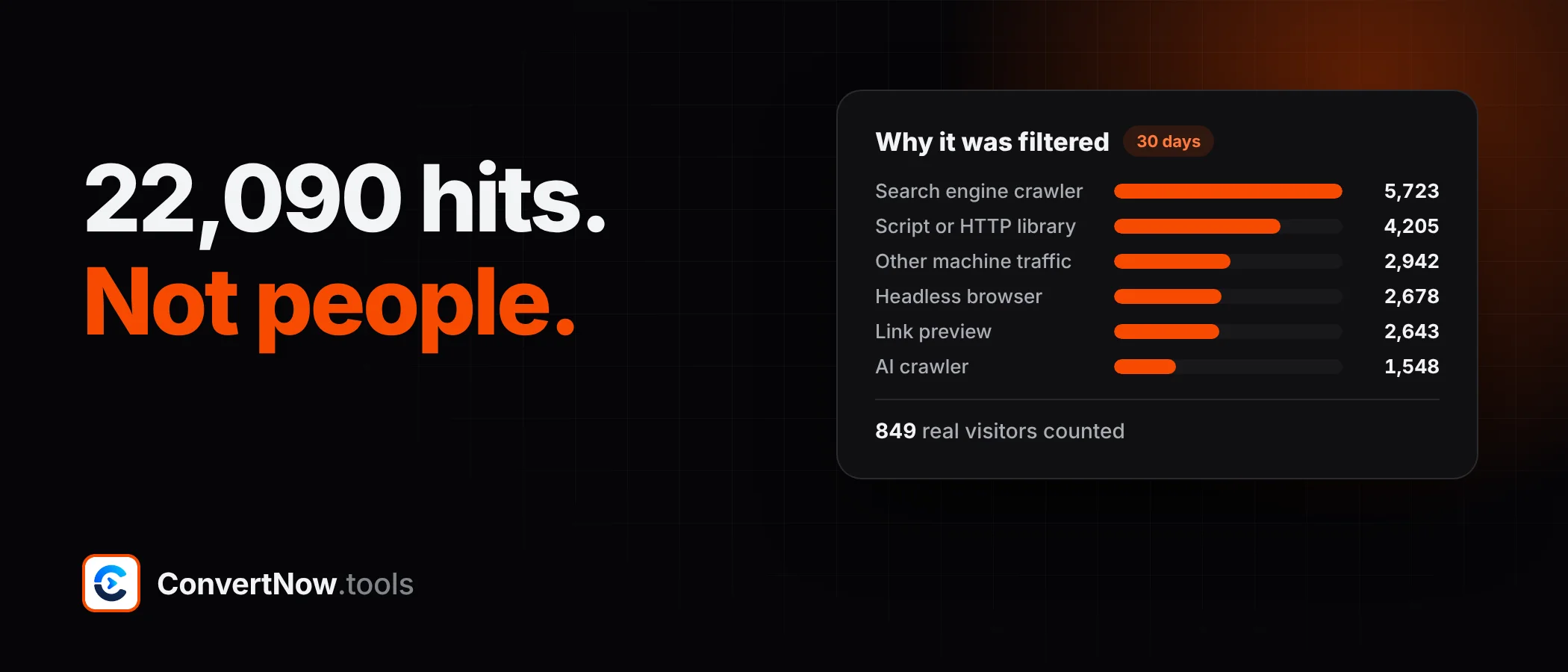
Here are the numbers from the last 30 days, straight from my own plugin: 849 visitors made 1,178 page views. In the same period the plugin refused 22,090 requests from machines. That is 94.9% of everything that tried to count as a view.
This is how the filter works, and what I got wrong on the way.
Who gets filtered
These are the reasons the plugin gave for refusing those 22,090 requests:
| Reason | Requests | Share |
|---|---|---|
| Search engine crawler | 5,723 | 25.9% |
| Script or HTTP library | 4,205 | 19.0% |
| Other machine traffic | 2,942 | 13.3% |
| Headless or automated browser | 2,678 | 12.1% |
| Link preview | 2,643 | 12.0% |
| AI crawler | 1,548 | 7.0% |
| Everything else | 2,351 | 10.6% |
Every one of those groups would quietly inflate a normal traffic chart.
Layer one: what the request says it is
Honest bots name themselves. Googlebot, ClaudeBot, GPTBot, PerplexityBot and Common Crawl all send a clear user agent. So the first check is a maintained list of known machine signatures.
When a request matches, the plugin does not throw it away. It files it under the machine's name. That choice shaped the product: site owners want to know which AI crawlers read their content, they just do not want those hits mixed into human numbers.
Layer two: how the request behaves
User agents are easy to fake, and scrapers often pretend to be Chrome. For those, the plugin looks at behaviour instead:
- Headless browsers leave small tells that a normal browser never shows
- Scripts and HTTP libraries skip the steps a rendered page always takes
- Link previews from chat apps and social sites fetch a page without anyone reading it
- Prefetches load a page that the visitor may never open
No single signal decides. They add up, and only requests that clearly look automated leave the human count.
Layer three: never slow the site down
A filter that slows the site it measures is a bad deal. The checks run on data the plugin already has. It talks only to its own REST route on your own server, and by version 1.2.0 it made roughly one request for every 1.2 page views. Network addresses are never stored.
What I got wrong first
When I compared my numbers with Jetpack Stats on the same site, Jetpack read 25 to 40 percent higher. I assumed my filter was too strict. It was the other way round.
On 12 October, Jetpack counted 12 editor previews of a page I was editing myself, plus visits that my plugin had refused as headless browsers, data centre traffic and prefetches. Countries, devices and referrers otherwise matched closely. The gap was machines and me, not missing readers.
That comparison also caught a real bug in my own product: ConvertDash, the hosted version, counted editor previews too. I fixed it in ConvertDash 1.9.6 the same day.
The machines, by name
Grouping by reason tells you why a request was refused. Grouping by name tells you who sent it. These were the ten busiest machines on the site over the same 30 days:
| Machine | Requests |
|---|---|
| Googlebot | 3,209 |
| Unnamed crawler | 2,943 |
| 2,516 | |
| PHP scripts | 2,053 |
| Headless Chrome | 1,820 |
| Sends no browser headers | 1,359 |
| Google Ads | 1,178 |
| Rendered, never touched | 795 |
| Bingbot | 790 |
| Cloud or hosting range | 672 |
Two of those rows only make sense once you know how the filter catches disguised visits. Rendered, never touched means the page loaded and ran its scripts, but nothing ever scrolled, clicked, focused the tab or moved. A real person almost always does at least one of those within a few seconds. Cloud or hosting range means the visit came from a data centre network, where people rarely browse from.
Paid ads bring their own bots
The biggest surprise for me was where a lot of this traffic came from. I run Meta and Google ads for ConvertDash. Every time an ad is shown or checked, the platform fetches the landing page.
- Facebook fetched pages 2,516 times, mostly to build link previews and review ads
- Google Ads checked landing pages 1,178 times
- The homepage alone was fetched 1,786 times by 39 different machines, more than double the human visitors to the whole site
Without a filter, every one of those would look like a visit, and the ad campaigns would look far more successful than they were. If you run ads and your analytics counts these, your cost per visitor is lower on paper than it is in reality.
What site owners get
Two clean views. One shows people. The other lists every bot and AI crawler by name, with the pages each one fetched.
If you run WordPress, the filter ships in the free ConvertNow Analytics plugin. For any other kind of site, ConvertDash uses the same approach.

